Post
G.SKILL DDR5-5600 CL36 AEGIS 5 16GB G.Skill Memory Review

G.SKILL DDR5-5600 CL36 AEGIS 5 memory is
It is a budget-friendly DDR5 memory released in Korea in September 2023 through Seorin C&I.
Traditionally, the G.SKILL brand has been recognized as the ultimate choice for those with extensive knowledge of computers and who dare to venture into more challenging areas such as overclocking.
It has various nicknames such as Jisooki and Jewel Bar, and has always released products that lead with unrivaled powerful performance, but on the other hand, it was not a brand that many consumers could access through its entry-level lineup.
But this time, G.SKILL seems to be breaking that tradition with DDR5 and releasing a more diverse lineup.

The AEGIS 5 memory introduced today is a product that signals the beginning of that, and is a budget-friendly DDR5 memory released with a friendly price range and a design that contains G.SKILL's identity.
Recently, it is said that many memories have experienced issues such as compatibility and boot speed when combined with AMD's latest BIOS for AM5, which enables overclocking up to high-speed interfaces.
Since the system I'm using happens to be an AM5 system, I conducted simple tests as well as compatibility checks and included the results in the review.
Let's start the review!
Specification

For desktop / DDR5 / 5600MHz (PC5-44800) / Latency: CL36-36-36-89 / 1.20V / Number of RAM: 1 / XMP / EXPO / On-die ECC / Heatsink: Heatsink / Heatsink color: Black
Product Features
Package contents
Let's take a look at the package contents first.

As with other memories, it is packaged in a plastic case with some cushioning. There is no separate seal.

You can see a hologram sticker that acknowledges that it is a genuine product distributed by Seorin C&I, the reliable official domestic distributor of G.SKILL.
If you attach this sticker directly to the memory, it will be convenient in case of AS.

Information such as capacity, speed, and timing is briefly written. If you know a little about memory, G.SKILL's performance is so overwhelming that even just that small G.SKILL logo will make your heart flutter.

Brand stickers that you can receive when you purchase parts such as CPUs are also provided.
Memory appearance

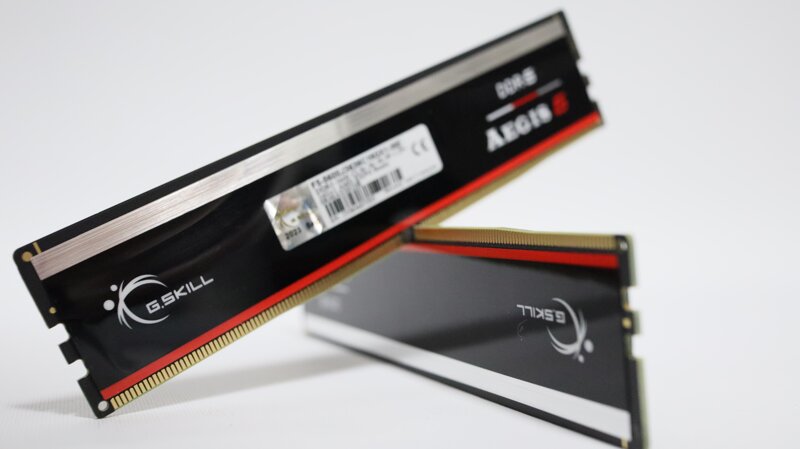
The memory has a clean design with an overall black color. It is very different from the design of Samsung and Hynix memory, commonly known as spinach or black spinach, and has a sticker made of a sturdy material with a long arrangement of different colored bar-shaped images, which is one of G.SKILL's characteristics.


And the noteworthy point is that this sticker is attached to both sides of the memory. Thanks to this, you can enjoy this clean image from any direction.

Based on the 16GB model, it is a single-sided memory, and it can be seen that the sticker is slightly floating on the side where the chip is mounted (top side).

As explained earlier, stickers are attached to both sides, especially to the side without chips, so it is a good option to complete a clean appearance when installed as shown in the image above.
Learn more about memory specifications
First, let's take a look at the information about the chip that you are most curious about.

I tried to remove the sticker to check the chip details, but I couldn't find information such as Hynix, Samsung, or Micron on the outside.

So I checked the information in the BIOS and proceeded with EXPO (XMP) settings. It can be easily set with EXPO settings for RYZEN systems, and it seems that it will not be much different from XMP settings for Intel systems. 5600MHz CL36 is set at 1.2V.

SPD information can also be easily checked in the BIOS, and it uses a Samsung chip manufactured in the 37th week of 23 and is equipped with ANPEC's PMIC.
Through this, you can confirm that it is difficult to set extreme overclocking, for example, setting a high clock of 7000MHz or higher, low timings, and applying high voltage.
However, please note that even with the same model, the manufacturer and specifications of the chip may change at any time depending on the production time.

I checked whether the settings were applied well after entering Windows on the Ryzen AM5 system I am using. You can see that the standard specification values of the memory are well reflected.

If you are using a Gigabyte motherboard, you can also check the Gigabyte-specific memory information window as shown above in the HWiNFO64 tool based on the latest BIOS. Here you can check more detailed values such as detailed timing information, so please refer to it.

In addition, you can see that the memory is equipped with a sensor that can check the SPD HUB temperature. If you try overclocking even briefly, you can refer to this information and apply voltage.

I monitored the temperature of the memory while conducting a TM5 test that puts a heavy load on the memory for about 30 minutes.
You can check the temperature change in a system with only case ventilation fans without separate direct cooling, and it maintained a normal range without any operational issues.

I tried a simple overclocking. Overclocking to 6200Mhz was possible without difficulty even with the voltage left at 1.2V. If you reduce the timing to the CL30 level and match the clock to the 6000 ~ 6200MHz level, you can create the optimal Ryzen system that can be synchronized 1:1.

When I applied a load at 6200Mhz CL36, 1.3V voltage conditions, the temperature was slightly higher than EXPO, but it was able to pass the stabilization test.
(Of course, please note that the overclocking rate may vary depending on the user's luck)
Check compatibility
AMD's latest BIOS is also okay~

AMD's AGESA 1.0.0.7.C BIOS is mainly about supporting high-speed memory of 6200Mhz or 6400MHz or higher, which was previously considered a barrier.
Of course, since it is not 1:1 synchronization, there is no dramatic performance change compared to the previous one, but it was a welcome BIOS update for those who have purchased and are using 7000MHz-class high-speed memory or those who are challenging overclocking.
However, after updating the BIOS, there are reports in the market that many users using various memories are experiencing inconvenience due to phenomena such as significantly slower booting speeds or situations where booting is not possible at all.
So I also conducted a test on the corresponding BIOS version (Gigabyte B650 AERO motherboard standard F9d).

Today's main character, G.skill AEGIS 5 memory, was able to be used normally in EXPO setting values without the above phenomenon, and there was no increase in boot time, so there was no inconvenience in using it.
For many computer users, it is more important to build and maintain a stable system based on reliable compatibility than a slightly faster clock and lower timing, so if you are using AMD's latest CPU and building a system with a standard specification, Jisooki AEGIS5 would be a good choice.
Overall review / Recommended target

Looking for stable and compatible DDR5 standard memory?
The G.Skill AEGIS 5 memory introduced today was a standard-spec DDR5 memory that showed a clean design and stable compatibility.
The following is a summary of the targets for recommending today's product.
1. Those looking for a cost-effective DDR5 memory from the premium brand G.Skill
2. Those who are building a clean all-black system or air-cooled system
Thank you for reading the long article, and I hope my review will help you choose a product.

This review content discloses that the product provided by Seorin C&I was introduced as part of the Seorin Supporters 5th activity without any intervention or restrictions.
IT Inven User Review신궁z
2023-10-05