Post
Here's how to link external services on your profile page!
Some of Vortex Gaming's official event benefits include rewards from external services.
To participate in these events, you need to link external services in your Vortex Gaming account profile.
The external service information (nickname, username, etc.) registered in your profile will not be shared with other members,and will only be used in Vortex Gaming official events and promotions.
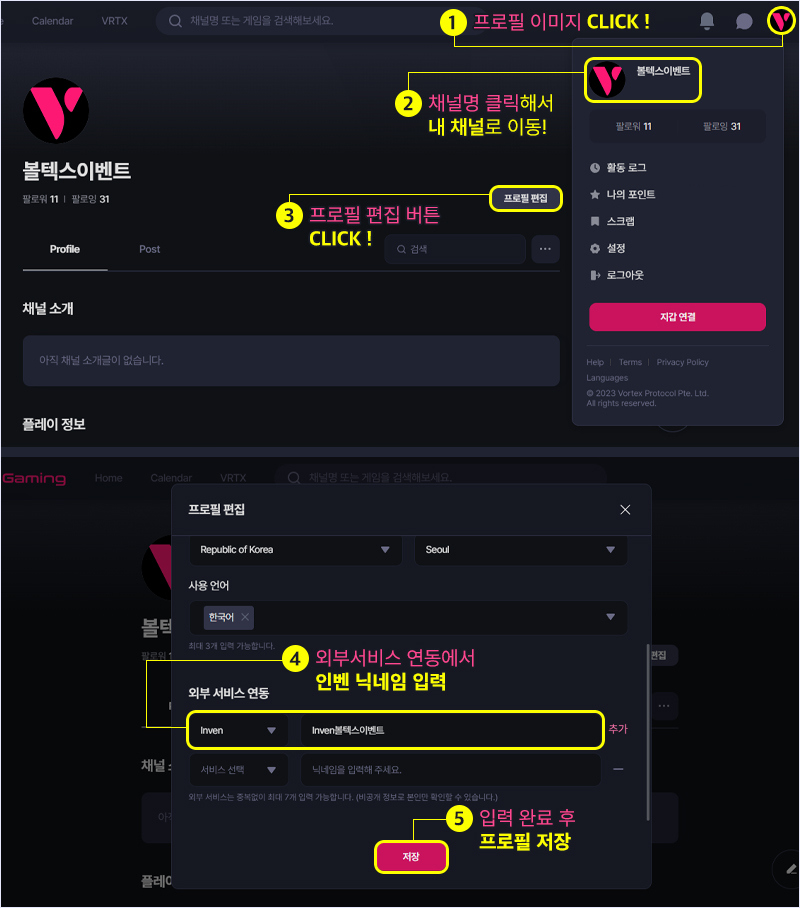
To receive Inven Points, link your Inven nickname as follows:
① Click the profile image in the upper right corner of the Vortex Gaming page
② Click on My Channel name to go to My Channel page
③ Click the Profile Edit button on My Channel's initial screen
④ Scroll down the Profile Edit screen and select Inven - enter nickname in External Service Linking at the bottom
⑤ Click Save to complete profile editing