Post
Review of the Samsung ViewFinity S6 S65UC S34C650U USB-C 34-inch wide monitor
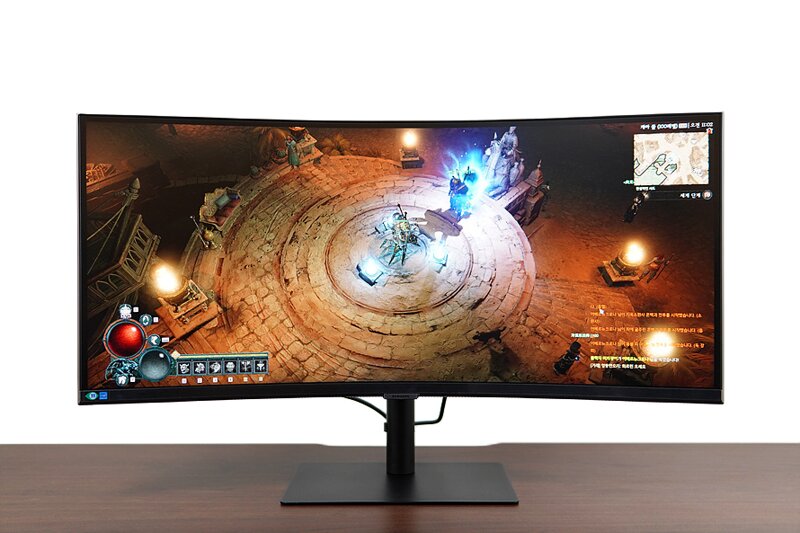
The demand and popularity of 21:9 displays are increasing these days for a pleasant environment when enjoying games, watching movies, or working. It is especially attractive to those who use dual monitors because it allows for a clean environment setup with just one unit. I would like to introduce the Samsung ViewFinity S6 S65UC S34C650U USB-C model, which supports 1 billion colors for more vivid image quality, USB-C PD 90W charging, a built-in KVM switch to control two PCs or a PC and laptop combination with one monitor, PIP, PBP, and built-in speakers to secure more desk space.
"삼성전자 뷰피니티 S6 S65UC S34C650U USB-C 디자인"

I only received the delivery due to a late work schedule, but since this product is large, a Samsung technician came directly to bring and install the product. The service of providing everything from shipment and delivery guidance messages to installation and defect testing is definitely an advantage of a large corporation manufacturer. Of course, all of this is done free of charge to the consumer. I was worried that the 34-inch ultra-wide would be too long, but it's not as burdensome as I thought. The design is also clean.

In addition, the 1000R curvature, which almost matches the human field of view, allows you to see the screen at a glance even if it is long sideways and provides a viewing angle that reduces eye fatigue.


The rear has basic HDMI, DP, as well as USB-C for data transfer and charging, USB-HUB, three USB-A ports, a headphone jack, and an RJ45 LAN port. Since most laptops now come with USB-C as standard, it seems good to connect and use with a laptop. Also, if you connect a LAN cable to the monitor and then connect a laptop, you can access the internet on the laptop even in an environment where wireless WiFi is not supported. This is a very useful feature. If you remove the stand, you can also use the 100x100 VESA hole.


The stand provides up and down (tilt), left and right (swivel), and height (elevation) adjustment functions, so you can freely set it to your eye level without purchasing a separate monitor arm.

The OSD uses a 4-way button located on the bottom of the front, which is not visible from the front and is not distracting, and the operation is more convenient than placing it on the rear.
"삼성전자 뷰피니티 S6 S65UC S34C650U USB-C 기능, 활용"


It uses a non-glare VA panel with a 34-inch curved screen, 21:9 aspect ratio, 3440x1440 resolution, and 350 cd/m² brightness, sRGB 115% specifications. Most importantly, while typical monitors support 16 million colors, the Samsung "ViewFinity S6" series for professionals can express 1 billion colors, giving it a strong advantage in games, videos, and photo editing with clear and realistic colors.


The OSD has a simple menu structure and an intuitive interface. You can easily handle various functions such as screen options, eye protection (Intelligent Eye Care) that automatically adjusts brightness and color temperature when the ambient brightness is low and reduces flicker and blue light, built-in speaker volume control, and FreeSync related to games.


The ultra WQHD 34-inch provides a wide display area that is like putting two monitors side by side, making it ideal for multitasking. It's spacious enough to display two web pages at the same time, and it's definitely convenient when editing photos or videos.

HDR10 is also available, and since it can express 1 billion colors, it provides richer colors in videos and games that can utilize HDR10.

I am very satisfied with playing games that support 21:9, 3440x1440 resolution settings in a 100Hz high refresh rate and FreeSync support environment. For reference, this monitor has a built-in 5W output speaker that supports AI sound optimization+, and it delivers better-than-expected sound as a built-in, so you don't need a separate speaker, and you can keep your desk space clean. (The sound in the game video is from the built-in speaker.)

The same goes for watching movies. The VA panel has good dark expression, a wide screen, clear picture quality, rich colors, and the immersion provided by the 1000R curvature, which is different from the 16:9 screen of a typical monitor.


It provides a built-in KVM switch that allows you to control two devices connected with one monitor, one keyboard, and one mouse, as well as PIP and PBP. This increases multitasking efficiency and saves costs and space. You can control the mode type, size, and layout in the simultaneous screen menu.

The C port also supports PD 90W charging, so you can charge while doing various tasks, and if you are a Samsung smartphone user, you can use mirroring and Dex support to use a large screen.
"삼성전자 뷰피니티 S6 S65UC S34C650U USB-C 후기"

Having used the Samsung ViewFinity S6 ultra-wide monitor, a hot new product released in March 2024, it seems to appeal not only to general consumers but also to professionals. Excellent color expression, clear screen provided by UWQHD, wide display area with a 21:9 ratio, and KVM switch and USB-C port make it perfect for any use, whether it's for work, games, or movies. The high-quality built-in speakers and the convenient AS of the large corporation Samsung are also key points. It's also good to use with a laptop, so if you're looking for a monitor with good efficiency and convenience, I think it's an excellent choice.


IT 인벤 유저리뷰사용기쵸이스진상
2024-03-27