Post
Glorious Model O Pro (Blue Lynx) Wireless Gaming Mouse
- Introduction
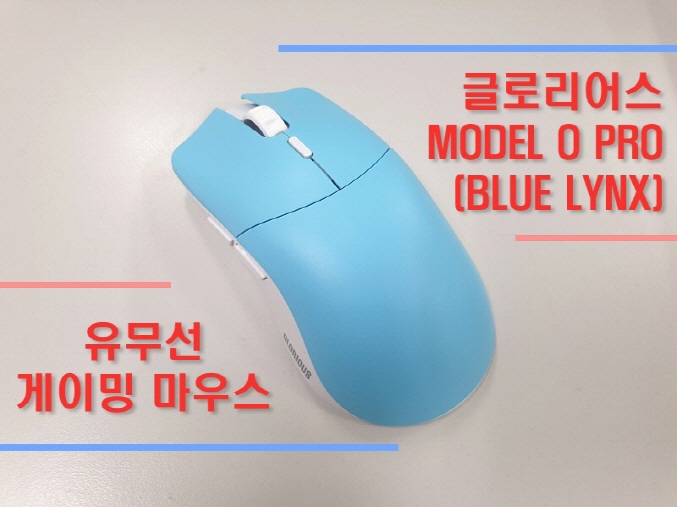
Hello! The product I'm introducing this time is the Glorious MODEL O PRO (BLUE LYNX) wireless gaming mouse.
gaming mouse.
The Glorious MODEL O PRO wireless product is a wireless mouse with a simple two-tone design and symmetrical structure that reflects the needs of various
gamers. It has a total of 6 buttons with a super-light weight of 55G.
It has 6 buttons.
It is equipped with a next-generation BAMF sensor developed with PIXART and a Glorious 80M switch manufactured in-house,
guaranteeing up to 80 million clicks. DPI sensitivity supports a total of 4 levels, up to 19,000 DPI. Track
king speed is 400IPS, acceleration is 50G, and polling rate is 1,000Hz.
Dual (wired, wireless) connection mode allows charging via USB-C type cable connection, and based on a full charge,
It can be used for up to 80 hours in wireless mode. (Bluetooth not supported)
The surface coating material is quite smooth, giving a soft touch and excellent grip, and 100% PTFE feet
are used to provide optimal sliding and braking.
You can set detailed functions such as key binding, macro, RGB LED, DPI, LOD, and debinding through the software.
and the colors are BLUE LYNX, RED FOX, and GOLDEN PANDA.
The free warranty period is 2 years from Jayworkskorea.
▶Purchase Linkhttps://prod.danawa.com/info/?pcode=18436784


- Package

The box is relatively small, and the MODEL O PRO BLUE LYNX model name is displayed on the top and bottom.

The box itself is made of very thick paper, so it will not be crushed or damaged.

Barcode number, QR code, serial number, and various certification marks are attached to the side as stickers.


The bottom is blue, the same color as the BLUE LYNX color, and the FORGE logo is in the center.

When I opened it, the mouse was well fixed inside the plastic frame. There are components inside.

The components are a mouse, receiver (dongle), receiver adapter, USB Type-C to A cable (wired and charging), manual
1 copy, and other stickers.

The bottom of the receiver adapter is made of rubber to prevent slipping, and the cable is treated with a noise filter,
The paracord structure is soft and flexible, and the total length is 2M.

- Appearance

The entire top has a blue design and a symmetrical structure with a total of 6 buttons. (For right-handed users)

The size is 128 x 66 x 38mm and the total weight is 55G, making it super lightweight.

The surface texture is more rough than smooth, so it prevents sweat and provides a better sense of adhesion.

The rubber scroll wheel and relatively small DPI button are highlighted in white.

Equipped with a next-generation BAMF sensor and Glorious 80M switch, it guarantees a maximum of 80 million clicks.

The bottom frame is white, and there is a C-type charging port in the center of the top front.

The front/rear side buttons are of a moderate size, and the GLORIOUS name is marked on the rear bottom.

The FORGE logo is displayed on the front of the right side. The surface texture is the same as the top.

If you look at the gap in the middle of the left and right click parts, you can see something subtle. This is the LED that indicates the charging status.

The entire material is matte.

The front/rear side buttons, DPI button, and scroll wheel button are all equipped with HUANO switches.

The size is somewhat large based on a man's small hand.

There are 4 white 100% PTFE feet on the bottom. Remove the blue protective sticker.

There is a DPI LED indicator on the left side based on the sensor, and a wireless power ON/OFF switch on the right.
There is a serial number displayed, and for reference, there is no separate receiver storage space. (in the box)
- Appearance and Click Feel Video

Overall, there were no buttons with a sense of incongruity, and the characteristics were a smooth click pressure and a cheerful click sound.
- Wired/Wireless Connection and Charging


For wired connection, turn the power switch to OFF and connect the USB-C cable to the mouse and computer.


For wireless connection, turn the power switch to ON and plug the receiver into the computer to automatically recognize it.
If you want to place the receiver closer to the mouse, connect it to the receiver adapter.

To check the wireless charging status, press the DPI button for more than 3 seconds, as shown above, between the left and right buttons on the top.
An LED appears. The charging status LED colors are red (0~25%), orange (26~60%), yellow (61~90%), and green (91%
~100%), and if the charging status is less than 7%, a red warning light will flash 3 times. Full charge
Based on this, it can be used for up to 80 hours in wireless mode.
- DPI LED

You can check it through the DPI LED indicator on the bottom of the mouse by pressing the DPI button, and the DPI sensitivity is
It supports a total of 4 levels (yellow 400, blue 800, orange 1600, green 3200) and a maximum of 19,000 DPI.
You can fine-tune the DPI in 100 units through the software, and you can also freely change the LED color.


- Grip


My hand size (F9) is slightly smaller than the average man's, and I prefer relatively small mice.
I tested it in the order of finger - claw - palm grip. It is for right-handed users with a symmetrical structure.
The size is somewhat large, so it fits well with the claw grip rather than the finger grip. The left/right side grip part is
The matte and rough surface material gave a sense of distinction, and I also got used to the palm grip to some extent.
- Sensor Test (Wireless Standard)


This is a reaction speed test.


This is a click speed test.


This is a sensitivity test.
- Software (Glorious Core)

Glorious Core program downloadhttps://www.gloriousgaming.com/pages/glorious-core

There is a profile (3) menu in the upper left corner, and a key binding and performance menu in the upper right corner.

The key binding menu allows you to set different, diverse, and detailed key assignments to each of the 6 keys.

Of course, you can check the wireless charging status and initialize it.

This is the macro setting screen. The screen is large and intuitive.

In the performance menu, you can set detailed DPI, LOD (vertical operating distance), debounce, and polling rate.
DPI can be set in 100 units, and the color can also be changed. LOD can be set to 1~2mm, and debounce can be set to 0~16ms.
Debounce is a function that prevents multiple inputs from being triggered when a single click is made. Increasing the time
If you give it, it will prevent additional clicks, and if you reduce it, additional clicks may occur, so find an appropriate time zone.
That's it. We recommend the default value.

- Overall review

▶Glorious MODEL O PRO (BLUE LYNX) Wireless Gaming Mouse Features..
- Clean with symmetrical structure and pastel two-tone colorsWireless gaming mouse
- Next-generation BAMF sensor developed with PIXART, total of 4 levels of DPI, maximum 19,000 DPI support
- Cheerful left/right click feel with Glorious 80M switch manufactured in-house
- Up to 80 hours of use in wireless mode based on full charge
- 55g ultra-light weight provides optimal claw grip and long-lasting comfort
- Tracking speed 400IPS, acceleration 50G, polling rate 1,000Hz
- BLUE LYNX, RED FOX, GOLDEN PANDA 3 color models
- Dedicated software support (key binding, macro, RGB LED, DPI, LOD, debinding)
- 2-year free warranty service (Jayworkskorea)
▶Purchase Linkhttps://prod.danawa.com/info/?pcode=18436784
"This review was written with a product provided by Jayworkskorea, the organizer."
IT Inven User Review Usage블레더
2024-05-04