Post
The perfect motherboard for a white aesthetic~! GIGABYTE B650M AORUS ELITE AX ICE PCDirect
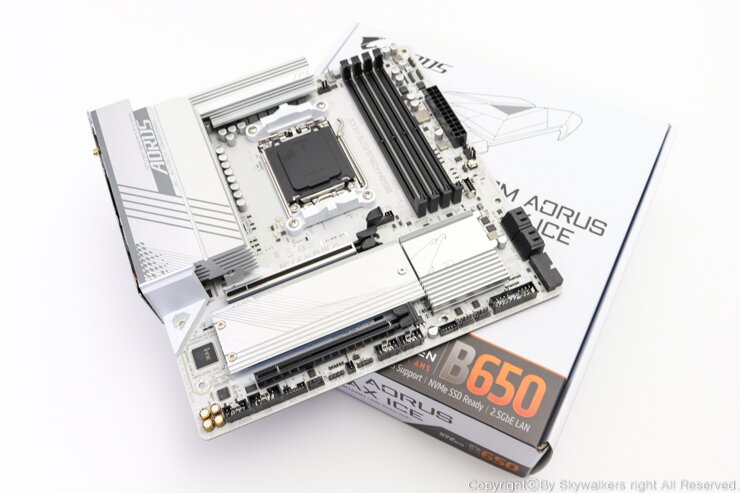
1. GIGABYTE B650M AORUS ELITE AX ICE (PC Direct) Introduction


This review will cover the GIGABYTE B650M AORUS ELITE AX ICE (PC Direct) motherboard.
Among the five chipsets newly released for the Ryzen 5th generation 7000 series Raphael CPUs (X670E, X670, B650, B650E, and A620), this is a budget-friendly chipset. It's a high-performance Mini-ATX (M-ATX) motherboard with a robust power section featuring a 16-phase (12+2+2) driver MOSFET, two M.2 slots, and thermal guards.
The GIGABYTE B650M AORUS ELITE AX ICE (PC Direct) follows the AERO G series, which was previously released with a white aesthetic. However, only the power section and M.2 heatsinks were white, while the PCB was black, making it slightly lacking for a full white-themed system build. The GIGABYTE B650M AORUS ELITE AX ICE (PC Direct), on the other hand, features white heatsinks and a white PCB, making it the best choice for a true white aesthetic.
This AM5 socket product uses an LGA method, eliminating the common AMD CPU pin-bending issue. It supports DDR5 memory with clock speeds up to 8000MHz (OC) and has four memory sockets that can accommodate up to 192GB (48GB single DIMM capacity).
Of the two M.2 slots, the top slot (slot 1) supports PCIe 5.0 x4, while the bottom slot (slot 2) supports PCIe 4.0 x4.
It features PCIe EZ-Latch for easy removal of memory from the PCIe slot and M.2 EZ-Latch for easy attachment and detachment of M.2 SSDs. It also supports Realtek 2.5GbE LAN chip with impressive bandwidth and Bluetooth 5.3 for connecting to the latest Wi-Fi 6E and various wireless devices.
As an M-ATX form factor (24.4Cm x 24.4Cm) product, the entire power section is 16-phase (12+2+2), with the 12 VCORE phases equipped with 60A output premium chokes, capable of supplying up to 720A of power. This ensures stable use with all currently available Raphael desktop CPUs.
GIGABYTE B650 AORUS ELITE AX ICE (PC Direct), which is an ATX standard, is also being distributed, providing a choice to configure the motherboard to suit your system.
Now, let's take a look at the GIGABYTE B650M AORUS ELITE AX ICE (PC Direct) motherboard.

Product Specifications
2. Package Contents


Overall box appearance
As a white-themed product, the box is also neatly packaged in white.

This product is provided with a 3-year warranty by PC Direct, the official distributor of Gigabyte.

Box opening

Contents

2 x SATA 6Gb/s cables

High-performance Wi-Fi antenna

User manual
3. Motherboard Appearance


Overall appearance of the GIGABYTE B650M AORUS ELITE AX ICE (PC Direct)
M-ATX form factor with a size of 24.4Cm x 24.4Cm


The power section MOSFET is equipped with an integrated large heatsink and a 6mm heat pipe for effective temperature control.

Chipset heatsink


The I/O interface backplate is integrated.
4. PCB LAYOUT


AM5 socket CPU chamber
The AM4 socket, which was supported up to the previous generation, used a PGA method with pins on the CPU. However, starting with this generation, it has been changed to an LGA method with pins on the motherboard. The phenomenon of the CPU cooler and CPU being pulled out together, commonly known as 'CPU extraction', will no longer occur.

AMD Ryzen 5-5th Gen 7600 (Raphael) CPU installed


16-phase (12+2+2) power section with a large integrated heatsink
VCORE is 12-phase and is equipped with 60A premium chokes, capable of supplying up to 720A of power.

Expansion slot section

M.2 thermal guard removed

PCIe EZ-Latch for easy removal of graphics cards

Supports 2 M.2 slots. The first slot supports PCIe 5.0 x4 speeds, and the second slot operates at PCIe 4.0 x4 speeds.


The two M.2 slots provide M.2 EZ-Latch for easy installation of SSDs. The hassle of fixing standoffs to the motherboard and connecting them with tiny screws is gone, greatly improving assembly convenience.

Audio chipset section with Realtek ALC897 codec

Front panel audio connector header


Supports 2 x 12V RGB headers and 2 x 5V ARGB headers, and you can synchronize various tuning devices with the desired colors and LED actions through Gigabyte RGB FUSION 2.0.

4x USB 2.0 headers

Front panel I/O cable connection header

4 x SATA 6Gb/s ports and 2 x USB 3.2 Gen1 headers

Front USB 3.2 Gen2 x2 Type-C port

24-pin ATX power connector


4 DDR5 RAM sockets supporting up to 8000MHz (OC) and 192GB of system memory

8-pin CPU auxiliary power connector
5. UEFI BIOS

You can easily configure the BIOS with Gigabyte's complete and new GUI.
The BIOS main screen is an easy mode with the same white color scheme as the motherboard, allowing you to check information at a glance.

Various setting menus that were previously located at the bottom right of the BIOS have been moved to the top, improving visibility.
Clicking the first menu on the top left, Help (F1), will pop up the shortcut keys.

Clicking the second English will pop up the language setting menu.
Korean is also supported.

Clicking the third Load Defaults (F7) will pop up the initialization menu.

Clicking Save & Exit (F10) will pop up the save and exit menu.


Clicking Favorites (F11) will take you to the Favorites menu in Advanced Mode.

Clicking Search (Alt+F) will pop up the Option Search window.

Below the top menu, the motherboard naming, BIOS version, and installed CPU and memory capacity are displayed. The system's speed and temperature information is displayed to the right.

Memory-related information and the EXPO setting button are located on the bottom left.

Clicking the XMP/EXPO button will pop up two setting profiles each.


There is a Smart Fan 6 menu in the center left, and clicking it will allow you to set the speed and settings of the fans connected to the motherboard.

The center displays the storage device connected to the M.2 slot.

The center right displays bootable devices.


Clicking Q-Flash on the bottom left will take you to the BIOS update screen.


There is a menu on the bottom center where you can easily set up DDR5 memory.


There is a DDR5 automatic booster function setting menu on the bottom left.


In Advanced Mode, you can make detailed settings through the main menu at the top.
You can overclock, monitor, set booting options, and update the BIOS.
6. Conclusion...


So far, we have looked at the GIGABYTE B650M AORUS ELITE AX ICE (PC Direct) motherboard.
The GIGABYTE B650M AORUS ELITE AX ICE (PC Direct) motherboard supports Ryzen 5th generation Zen 4 7000 series Raphael, as well as the 9000 series Granite Ridge, which is scheduled to be released at the end of July this year.
Since it has been officially announced that the socket will be maintained until 2027, it is expected that it will be usable up to at least the 1100 series, so there does not seem to be any penalty for purchasing it now.
The 16-phase (12+2+2) power section, with the 12-phase core power section equipped with 60A premium chokes, can supply up to 720A of power, making it high-quality enough to stably cover even the 7950X, which has the highest power consumption.
The power design of the announced 9000 series CPUs has been lowered, and it is expected that low-power design will continue in the future, so it seems that even the highest-performance high-end CPUs can be used sufficiently until the end of the socket's lifespan.
It supports one M.2 slot with PCIe 5.0 x4 bandwidth and one M.2 slot with PCIe 4.0 x4 bandwidth, and it also has many features for user convenience, such as a Q-FLASH PLUS port for easy BIOS updates, PCIe EZ-Latch for easy removal of graphics cards, and M.2 EZ-Latch for easy attachment and detachment of M.2 SSDs.
Recently, there have been many users who want to build a white computer system, so the GIGABYTE B650M AORUS ELITE AX ICE (PC Direct), which can be said to be the best choice to maximize the white aesthetic with not only the heatsink but also the PCB color in white, is highly recommended, and I will conclude the review.
This concludes the GIGABYTE B650M AORUS ELITE AX ICE (PC Direct) motherboard review.
'This review was written with product provided by PC Direct.'
IT Inven User ReviewSkywalkers
2024-07-01