Post
Duo Face, Dual Mode. COUGAR DUOFACE PRO RGB Case Review & Usage
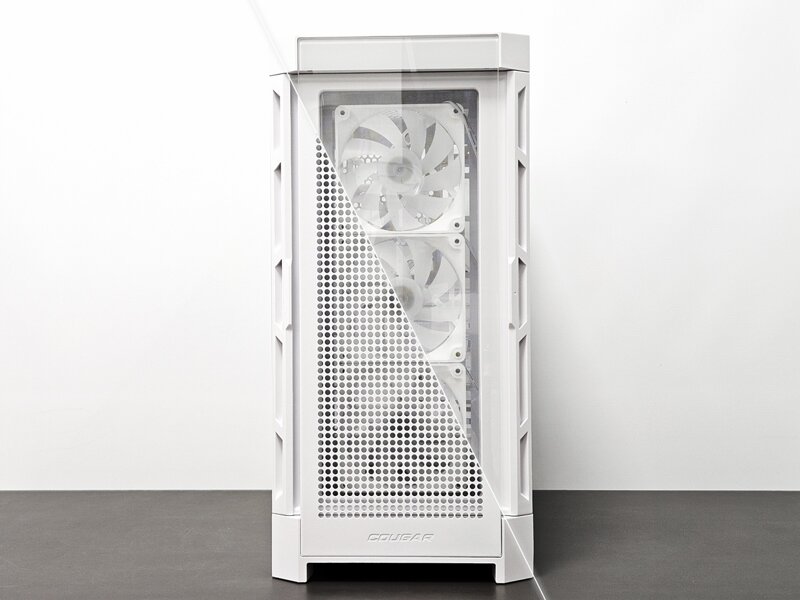
Have you ever wanted a case but it was a tempered glass case instead of a mesh case, or a case that would be perfect if you could just remove the mesh panel and attach tempered glass? There are so many different cases, but the journey to find a case that you 100% like is not easy. The Cougar Duoface case is a product that starts from that question. As the name suggests, this case boasts a unique design with two faces. With the ability to freely switch between the mesh panel and the tempered glass panel, it provides an ideal choice for users who are struggling between performance and aesthetics. In this review, we will take a closer look at the features and advantages of the Duoface case, and the points I felt during the actual assembly process. Let's see if this case can be a case that you '100% like'.

The COUGAR DUOFACE PRO RGB case is available in black and white, and comes with a mesh panel as standard, so there is no separate sub-classification. It is a mid-tower case that can be equipped with a 360mm liquid cooler on the top or front, so it is a versatile case that can be selected from low-end to high-end.

The basic configuration includes case accessories, fan splitter cable, and a mesh panel. Considering that many cases require separate purchase when the front panel is replaceable, it is a pretty good configuration.


The COUGAR DUOFACE PRO RGB case is made of all white tones, and COUGAR's unique solid-looking pattern is incorporated into the front as a design element. The front design that protrudes slightly forward is quite aggressive, but the overall neatness and balance are impressive.

The front of the COUGAR DUOFACE PRO RGB case is designed to be easily separated. Because it is a ball head type, it comes off when you pull it, and it is easy to replace and install, so it is convenient to change it often. Tempered glass is good for seeing the colorful RGB directly, and the mesh panel is good for enjoying the LED scattering through the mesh. It is also a performance difference factor, but it is an element that shows a big difference in how you see the LED. I will show you this again in the LED rendering photo after assembly.

When you remove the panel, there is a dense dust filter. Because it is located between the fan and the panel, you can install and use the filter in the same way no matter which panel you replace it with.

This dust filter can be removed by sliding it. Since there is no metal material on the panel with the dust filter, it seems easy to wash with water.

Another great thing about the COUGAR DUOFACE PRO RGB case is that it comes with 4 ARGB bundled fans as standard. Since it rotates at a maximum of 1000RPM, the performance as a case fan is sufficient, but the RPM does not rise excessively, so it is a positive factor for most PC users who do not set and use the fan RPM in detail.

The top panel has a dust filter on the outermost side, and can be equipped with up to a 360mm liquid cooler or 3 120mm fans or 2 140mm fans.

For reference, I put a lot of effort into the top dust filter. I was surprised because it is a quality that is rare in cases in the early 100,000 won range. Unlike most high-end cases that use magnetic tape dust filters, it has 6 built-in powerful magnetic magnets that appear to be neodymium, and it is made to the level of a panel rather than a dust filter.

The top IO panel has 2 USB 3.0 ports, 1 USB 2.0 port, 1 Typc-C port, a power button, an audio port, and a reset button. For reference, this reset button is also used to change the RGB effect of the bundled ARGB fan. (Short click: Change effect with button / 3 second click: Motherboard synchronization mode / 6 second click: RGB OFF)

Thick tempered glass is installed on the side. Since there seems to be little tinting, it goes well with the white case.

The tempered glass on the side is primarily fixed with magnets, and secondarily, it can be opened by loosening the hand screw and pulling the door handle, making it easy to open and close.

Looking inside, the motherboard supports up to E-ATX size, so I made good use of the generous internal size. The graphics card can be installed up to 390mm if the radiator is not installed on the front. (RTX4090 FE length: 304mm)

Inside, there is a cable guide bracket with the COUGAR logo. It can be moved to the side by about 1~2cm for E-ATX motherboard users, or it can be removed altogether. It plays a role in neatly covering the 24-pin cable connected to the motherboard. It has the advantage of looking neater than the rubber hiding method.

The cable guide includes a graphics card support as standard. The most important thing when using a graphics card support is that the support should not be visible. This is because I think the graphics card support ruins the overall PC build design. The only way to hide the support is for the case company to build in the graphics card support as standard. The COUGAR DUOFACE PRO RGB case has the most exemplary form of stable, hidden, and space-saving graphics card support built in.

It supports the addition of 2 120mm fans on top of the internal power supply cover. I'm happy with this element because I tend to install fans without missing anything.

The PCIe slot is equipped with a reusable slot. I personally don't like having case flesh between the PCIe slots. This is because it interferes with the installation of a riser kit to vertically mount the graphics card. However, in the case of the COUGAR DUOFACE PRO RGB case, it has a case-supported riser slot that eliminates the need to purchase the riser kit itself, which is quite welcome.

In the case of the front fan bracket, you can easily remove it by turning the hand screw. If you assemble it, you will know that it is difficult to install the front fan on a tower-type case because the driver angle does not come out. The detachable panel is applied to improve assembly convenience.

The case cable management panel has a clean solid design and matches the case color.

The cable management panel can be opened and closed by sliding it. You can remove it by disassembling the two hand screws on the back, grabbing the handle, and pulling it.

The cable management panel on the back of the COUGAR DUOFACE PRO RGB case consists of a cable routing space / hard disk bay / power supply basic three-tier configuration, and a layout for installing SSDs on the back of the motherboard tray.

You can see 3 cable ties for organizing thick cables and 5 cable tie holders to help with neat cable management.

One of the advantages of the COUGAR DUOFACE PRO RGB case is the ARGB controller & hub built into the case. As the name suggests, it not only serves as a simple hub, but also serves as a controller that allows you to change the RGB effect using the reset button on the case so that you can use it even if there is no 5v ARGB terminal on the motherboard.

The hard disk bay adopts a method of loosening the hand screw, pressing the lower handle, and separating it. In the case of other tower-type cases, most hard disk bays are fixed, and a bracket is attached to the hard disk and inserted, but the COUGAR DUOFACE PRO RGB case is made to be completely detachable, which is clearly an advantage in terms of cleaning and maintenance.

When you remove the hard disk bay like this, you can install up to 2 3.5" hard disks up and down.

Two SSD trays are installed on the back of the motherboard.

The cable management panel provides an average cable management space depth of about 2.2 cm, so there is not much difficulty even if there are many cables.
 When assembling, if the screw holes of the power supply are designed only in a circular shape in a low-end case, it may not fit slightly when installing. It seems that such experiences occur more often with power supplies. The COUGAR DUOFACE PRO RGB case prevents such problems by designing the screw holes wide to the side.

A dust filter that can be pulled out by sliding is also installed at the bottom of the case, under the power supply.

The most curious thing about the COUGAR DUOFACE PRO RGB case is the temperature comparison benchmark between the front mesh panel and tempered glass. First of all, to tell you the conclusion, there is not much difference as shown in the data.

The reason is that even when the tempered glass panel is installed, there is already a considerable air inflow space between the dust filter and the tempered glass, and there is quite a space between the fan and the tempered glass. So, you can think that it is always exerting more than 97% of the case performance even when tempered glass is installed. But that doesn't mean the mesh panel is meaningless. The mesh panel is more helpful for immediate temperature changes and can be useful in overclocking and benchmarking situations where 3% can cover the performance.


After assembling the COUGAR DUOFACE PRO RGB case, I tried to create both mesh panel and tempered glass panel modes and vertical graphics card installation. In the case of tempered glass, the LED also comes on from the COUGAR logo at the bottom, so it is good for creating a colorful layout, and in the case of the mesh panel, the LED looks like it is indirectly reflected, so you can reduce eye strain and create a high-performance layout that looks like it is wearing armor.

The COUGAR DUOFACE PRO RGB case that we looked at today has the concept of being able to freely switch between mesh and tempered glass, in line with the concept of having two faces. It can be a case that satisfies everyone who hesitated because of the tempered glass or mesh panel even though they liked the design, and for some, it may be a case that can be selected according to the situation by replacing it with tempered glass that is good for viewing during weekday work, and replacing it with a mesh panel when playing games and overclocking tests on weekends.
The COUGAR DUOFACE PRO RGB case boasts excellent cost-effectiveness that is hard to imagine in the early 100,000 won price range. Detachable panels that improve assembly convenience are introduced everywhere, and 4 ARGB bundled fans and an ARGB controller and hub are built in. In particular, the fact that it provides both tempered glass and mesh panels without having to purchase them separately is a great advantage of this case. Thank you for reading the review until the end.

This review content is part of the 6th Seorin Supporters activity and discloses that the product provided by Seorin C&I was introduced without any intervention or restrictions.
IT 인벤 유저리뷰사용기디젯
2024-08-27