Post
Unity 6's 2D Innovation: Comfortable with Pixel Art and Mixed 2D-3D
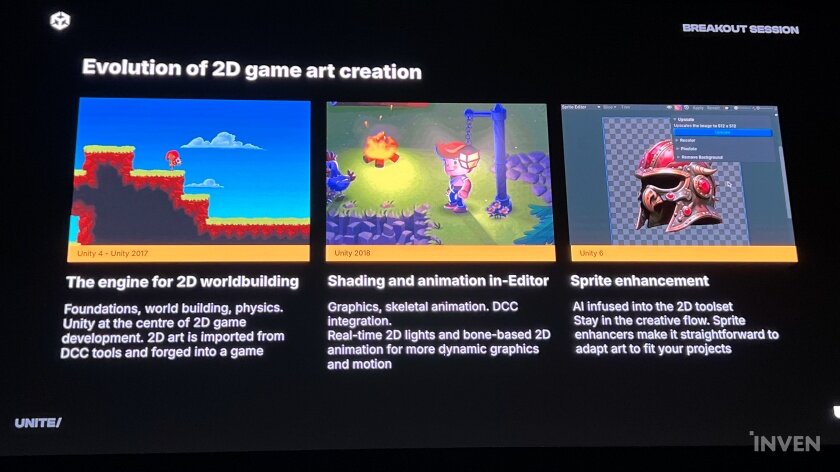
Unity, unusually among commercial engine developers, has established a 2D-specialized team and has consistently created technologies related to 2D game development. They have already presented 2D-related technologies at GDC 2012, and from the Unity 4 era to Unity 2017 versions, they have focused on implementing features for creating the foundation of 2D games and 2D worlds. Since 2018, they have improved the editor to enable shaders and animations. Furthermore, they are continuously developing technologies related to 2D, including skeletal animation, real-time 2D lights, and generative AI. As 2D offers experiences that realistic 3D graphics cannot, they have focused on enabling developers to create their results more easily and conveniently.
And now that AI has become a hot topic, Unity has been showcasing 'Muse,' which incorporates generative AI, as a test since last year. It goes beyond simply presenting images based on keywords, allowing for extensive checking and writing of textures and code. Unity, which has been developing various technologies for developers regardless of 2D or 3D, what kind of innovation will they show in the 2D field this time? Ruth Scammell, Unity's 2D Product Manager, introduced the technologies Unity has prepared at Unite 2024.
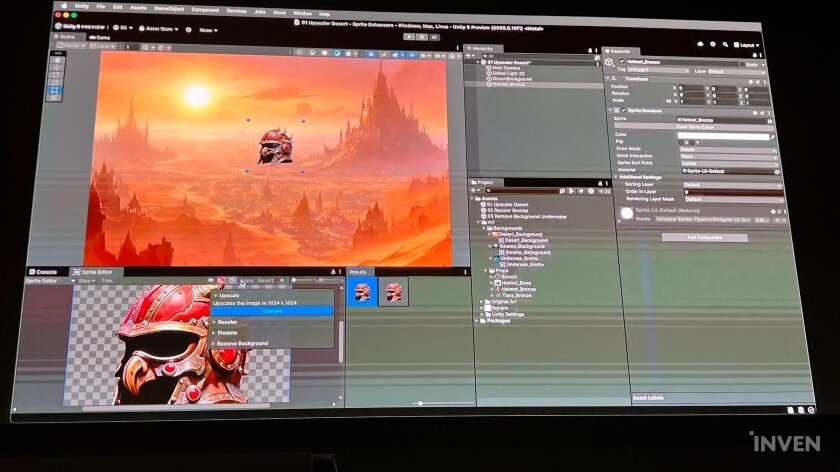
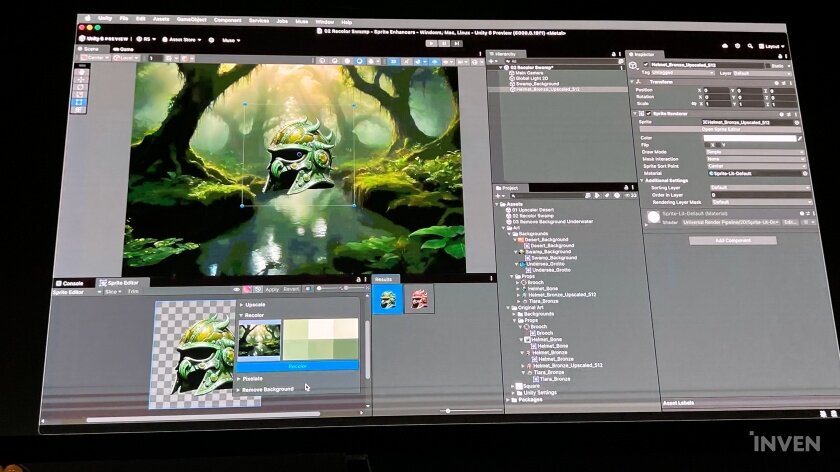
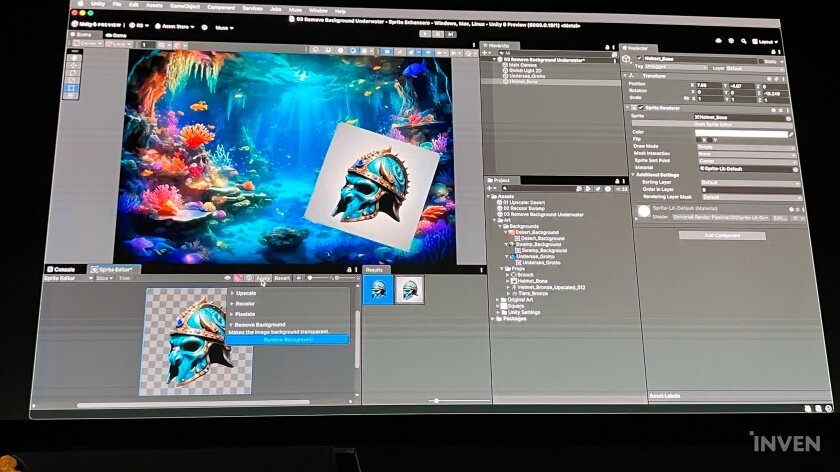
One of the representative technologies to be showcased in this Unity 6 is 'Muse 2D Enhancer.' By utilizing AI, it allows users to upscale specified sprites within the editor, change them to different color tones, or remove the background of images that were accidentally left in.
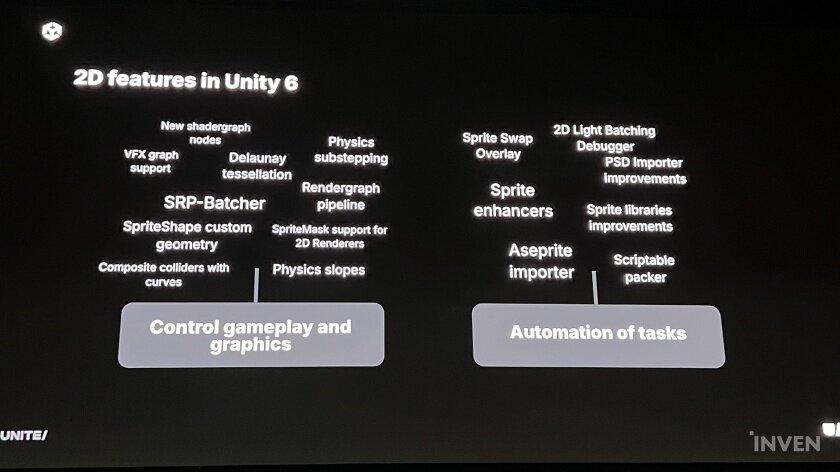
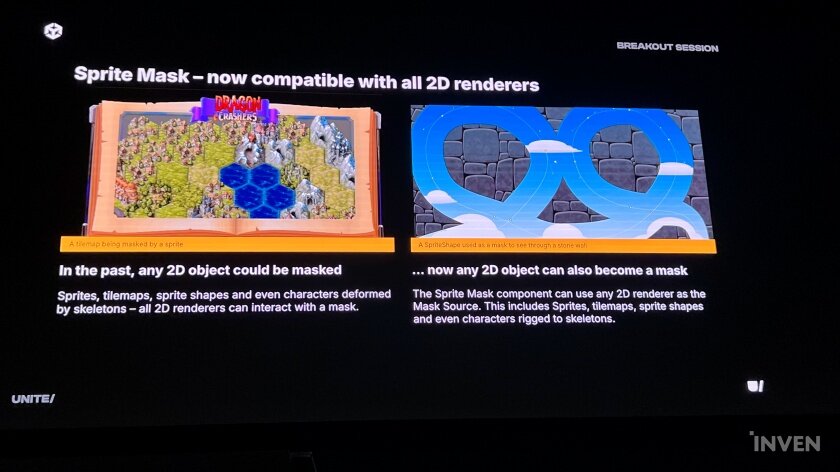
In addition, sprite masks could only utilize sprites as a source, but in Unity 6, all 2D renderers can be used as a source for various applications. In the demonstration, the renderer of a cloud sprite was applied on a stone wall, creating an effect as if there were cloud-shaped holes in the stone wall, revealing the sky. The target is not limited to sprites but also includes splines. Previously, a complex process was required to create such scenes, but it was emphasized that the flexibility of setting sprite masks has increased the degree of freedom. Furthermore, the Sprite Library UX has also been improved, allowing users to view and change them directly in the scene view.
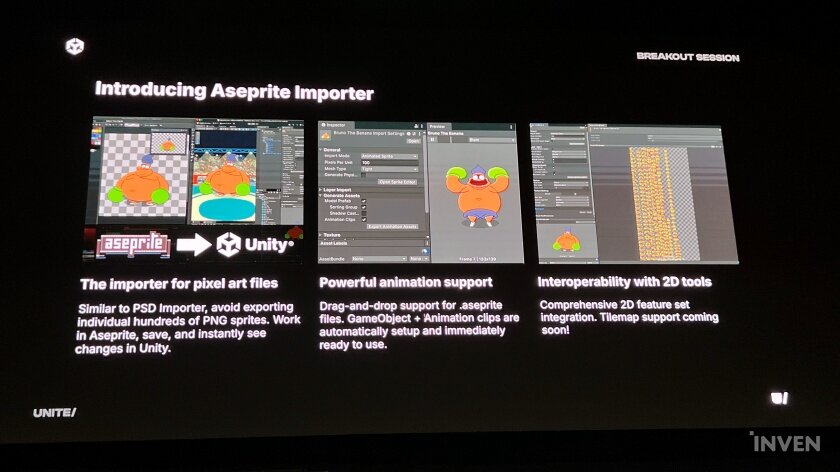
If Unity's 2D has been improved mainly around sprites, this time there will be a big change in pixel art as well. This is because the Aesprite Importer, which allows developers who draw pixel art to import files created with 'Aesprite' directly without separate format conversion, will be applied.
Just as Unity previously brought in formats worked on in Photoshop with the PSD Importer, putting files in with the Aesprite Importer brings in all the contents that have been worked on. Previously, hundreds of PNG sprites had to be extracted and animation clips reassembled, but with the Aesprite Importer, each part as well as animation controllers and clips are reflected in the assets. Even modifying something worked on with Aesprite and importing it will immediately reflect the modifications. You can also edit 2D sprites like dots by using the 'Pixelate' function in the Muse menu of the Sprite Editor.
Not only has the convenience of 2D work been improved, but optimization has also become more pleasant. By applying the SRP Batcher, which transfers the burden of the CPU to the GPU, to 2D, scenes with sprites with high-density meshes applied will run more smoothly than before. In addition, the 2D Light Batching Debugger allows you to compare batches, check where collisions occur, and appropriately place lights and shadow casters.
In addition, sub-stepping is applied in the 2D physics section as well. Sub-stepping is a technique for providing stable simulations by dividing the work of the physics engine into sub-steps. It doesn't just apply it, but also allows you to customize when to apply sub-stepping.
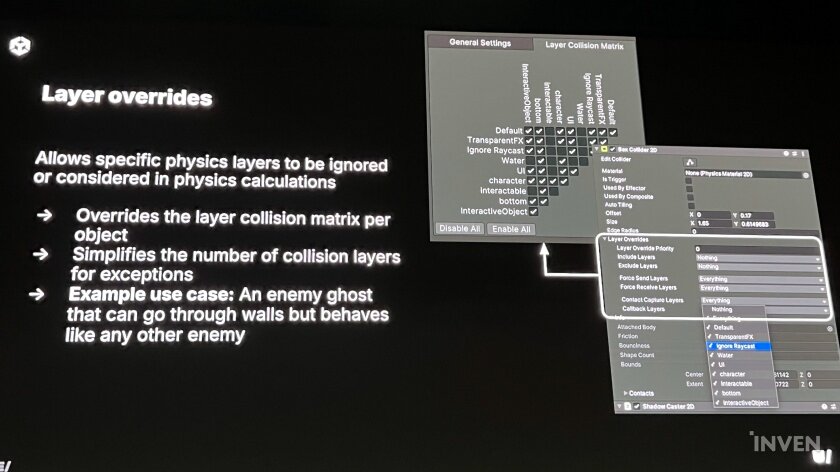
Layer overrides were originally only changeable in the Physics 2D-Layer Collision Matrix, but now you can adjust the layer collision matrix per object in the Collider2D component window. In other words, you can adjust the collision exceptions of multiple objects more easily, simply, and finely than before. In addition, the layer to which physics simulation is applied can also be selected in Physics 2D.
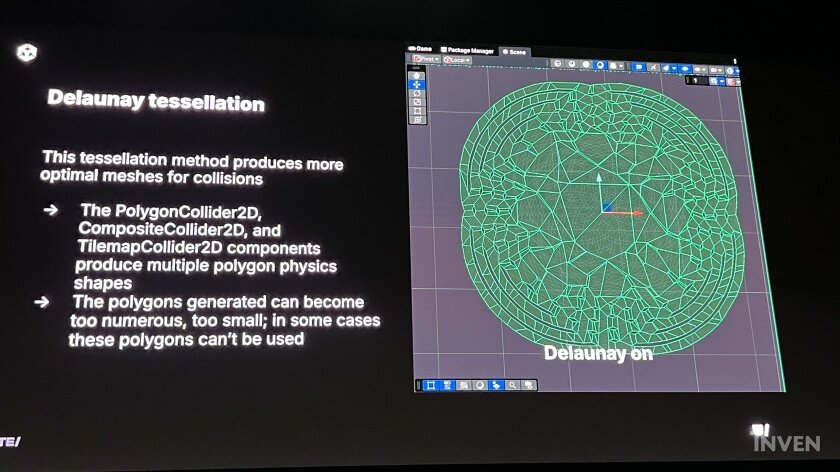
Unity has also prepared a way to make better use of Polygon Collider 2D, Composite Collider 2D, and Tilemap Collider 2D, which have been underutilized due to chronic problems. The aforementioned colliders implement a large number of polygon physics shapes, but they have not been used much because the number of polygons is sometimes too large or sometimes too small. By applying Delaunay tessellation here, polygons that are 찍히는 in duplicate locations are reduced, or polygons that are not in the required locations are created.
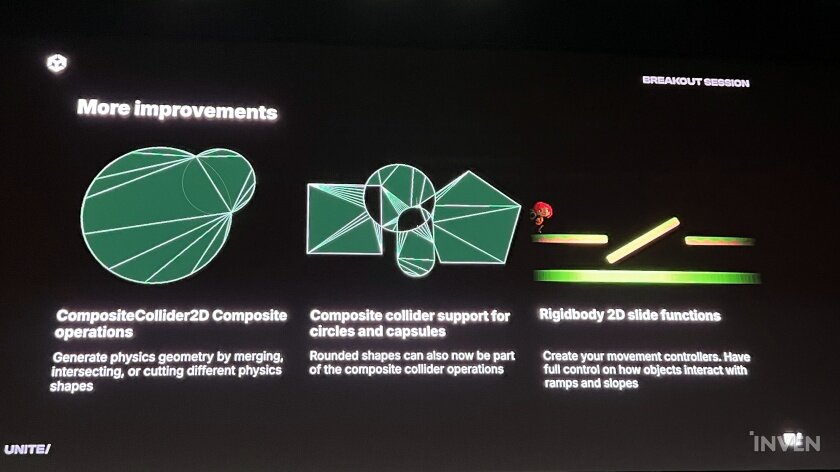
In addition, Composite Collider 2D supports merging, intersecting, and cutting, making it easier to create the shape you want, and it is also possible to attach capsules or circles. Also, with the slide function in Rigidbody2D, it becomes easier to respond to slopes when creating movement controllers.
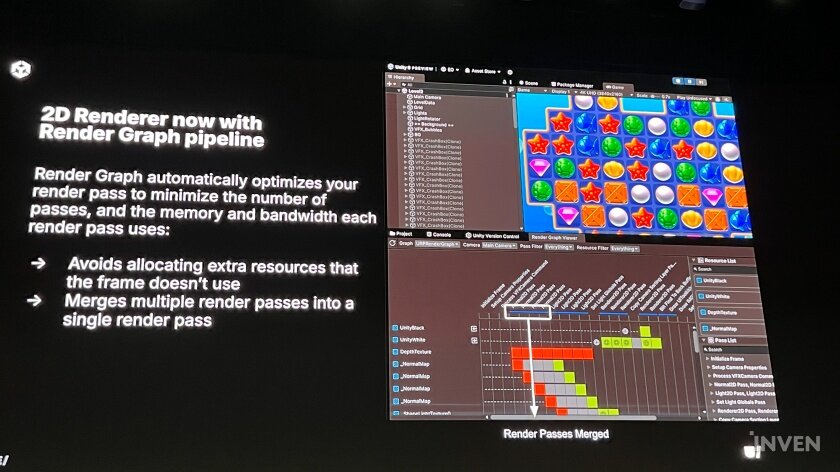
In addition, there are various convenience features for 2D developers, such as the Sprite Shape Geometry Creator, which is useful for creating caves or punch holes, and the Scriptable Packer, which makes it easier to package assets in Sprite Atlas, an asset that combines multiple textures into a single texture. In addition, the 2D renderer is expected to be easier to optimize by utilizing the Render Graph Pipeline.
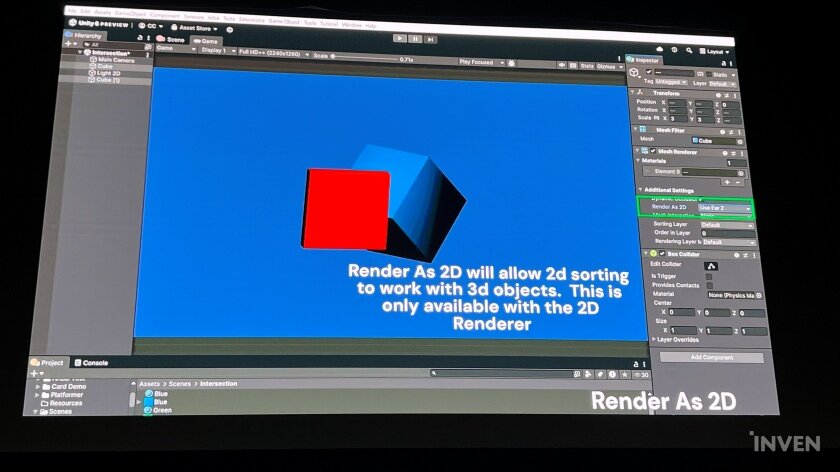
Finally, Scammell Manager additionally introduced 2D technology that Unity is still working on. It is Render as 2D, which renders 3D objects like 2D and allows them to interact with 2D. Recently, there have been many games that utilize both 2D and 3D, but unlike viewing on a flat surface, 2D and 3D do not basically interact. Therefore, several artificial operations had to be performed to make them interact.
However, this Render as 2D renders 3D like 2D, and without any special measures, it will naturally move in accordance with the 2D environment, including collisions and camera views, literally 'as it appears.' This technology is still under development and it is uncertain when it will be applied, but Unity has conveyed that it is considering various aspects for 2D developers as well as the latest 3D graphics.
■ Q&A

Q. The 2D renderer will now be included in the render graph pipeline, and I'm curious if image components and UGUI are also included there. Also, I feel like particles are not well supported in general UI, is there anything included in the roadmap for this part?
= That part seems to be a question for the UI Toolkit team. It seems difficult to answer right away. However, I know that this feedback is important to developers, and I will pass it on to the UI Toolkit team. I fully understand the desire for all renderers to be integrated and easier to work with.
Q. Earlier, didn't you show how to change the color of an image in real time using the colors in the color palette through the Muse 2D Enhancer? Is this feature customizable?
= Currently, it is a method of dragging a reference image and using the provided palette, but we plan to add more customization in the future by reflecting user feedback.
Q. The various preview features you showed at the end are eye-catching, when are they scheduled to be applied?
= It's hard to say the exact date, but we're already working on it. We plan to release it in stages, and the first part to be applied is the application of the render graph pipeline for the 2D renderer.
Q. You talked about Render as 2D, which is 2D and 3D interoperable, and you said that sprite masks can be used anywhere, so can they be used on 3D objects?
= Yes. However, you must render in 2D to use sprite masks.
Q. I talked about Render as 2D, so what kind of lighting should I use in a mixed 2D and 3D environment? I'm curious whether 3D reacts to 2D lighting or 2D reacts to 3D lighting.
= 3D reacts to 2D lighting. As I said before, it's rendering 'like 2D'. And technically, it was more difficult to apply 3D lighting to 2D. There is an angle at which 2D is not reflected when it receives 3D lighting. This technology is still under development and is undergoing several operations, so it is difficult to say for sure when it will be applied. However, I was able to confirm your interest, and although it is still early, we want to gradually complete it through feedback in the future.
웹진 인벤윤서호 기자
2024-09-22