Post
Efforts to escape ElvUI
Let's ditch ElvUI.
11/29 Removed some addons.
9800x3d, ddr5 cl30 6000mhz, 7900xtx
Mythic 20-man Obynax
The raid frame looks like Cell, but it's the default WoW raid frame.
--------------------------------------------------------------------------------------------------------------------------------
Added 10/29 Cell is not a lightweight addon, but it's easy to configure, pretty, and I like using it.
If you still have lag after ditching ElvUI, switch from Cell -> SUF, or if you're a DPS, just use SUF for the unit frames.
(When tested in a 30-man raid, SUF had about half the CPU usage compared to Cell raid frames for me)
However, SUF is a bit difficult to configure. If you want to track debuffs or see healer buffs...)
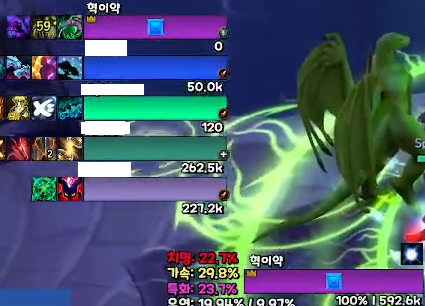
(Example of SUF usage during Dragonflight)
I recommend using the default Blizzard raid window. Healers can use Grid2 or...
I recommend trying raidframesettings.
If you still want to use Cell, turn off all the unnecessary buff/debuff display features when raiding, and in the raid debuffs,
I recommend leaving only the debuffs that healers need to track and unchecking everything else.
-----------------------------------------------------------------------------------------------------------------------------------
Addon list to do so
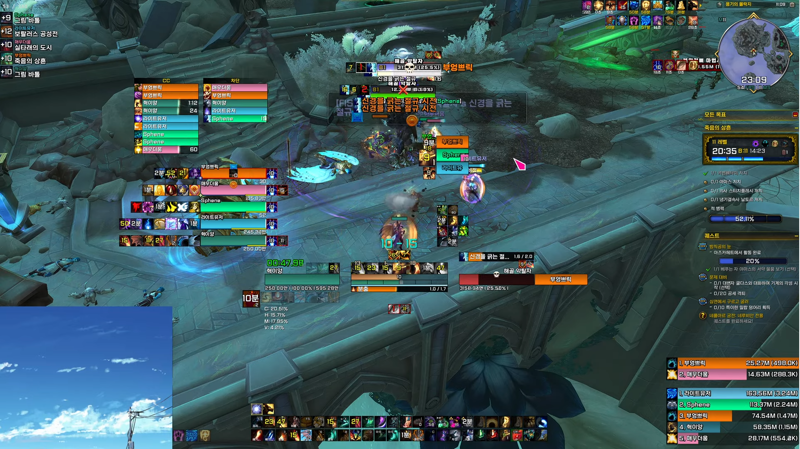
Mythic Keystone - AngryKeystones
Hide default bags and menu - asHideBagsBar
WoW Auction House Helper - Auctionator
Boss and Dungeon Alerts - BigWigs, LittleWigs
Copy default chat window address - ClickLinks
Raid and party members and unit frames - Cell, Cell - Unit Frames (/cell opt, How to move unit frames /cuf edit)
Meter - Details
Ground Warnings - GTFO
Hides icons around the minimap in a bar format at the top - HidingBar
Hide default action bar borders - HideActionBarBorders
Spell ID information - idTip
Convenient settings such as WoW auto-vendor - Leatrix_Plus
Clock and frame display - MinimapStats
Raid assistance - MRT
Mythic Keystone assistance - MDT
Display cooldowns in seconds - omnicc (can be replaced with basic functions, but does not display player dot duration)
Raid and party member cooldowns and survivability - OmniCD
Enemy nameplates - Plater (alternative KuiNameplates)
Range - RangeDisplay
Tooltip - TinyTooltip-Reforged
Cast bar - Quartz
WeakAuras - WeakAuras
Additional
Check WoW real-time addon usage and memory - Addon Usage
Check WoW errors - BugSack, BugGrabber
Add more variety to WoW textures - SharedMedia
Automatic combat log recording - SimpleCombatLogger
If you want to move the party finder eye, move it with Dominos or MoveAnything.
This is a list of addons that only use what is necessary.
Many people use adibag for bag addons, but don't use it, it causes lag.
The lag that occurred when pulling a big pack at the entrance to the Academy during Dragonflight was due to that. Just use the default bags.
Additional Plater is a very heavy addon.
If you look at the scripts or mods inside Plater, you'll see that it's tracking a lot of unknown spells. Look at the spells inside and
If you think it's not that important, I recommend deleting it. If that's too difficult,
I recommend switching to KuiNameplates.
Additional Dominos is a fairly lightweight action bar, but the extra bar has been known to freeze from time to time since the old days,
I don't use it. You might end up in a situation where you go to a dungeon and can't shoot the third orb at the 3rd boss... GG
You can apply skins with something like Masque, but it consumes a lot of resources and slows it down a bit.
If you use wow clear icon, it loads from the start of Waru, which is even better.
C:Program Files (x86)World of Warcraft_retail_Interface
If you put it in this folder, it will load automatically at startup.
WoW graphics settings
Just leave the rendering at 100% (this is more common for people with frame drops)
It will help if you adjust the other settings. Just adjust the viewing distance to your liking.
For those who use CPUs with p-cores and e-cores after the 12th generation,
Check and set wow.exe to be allocated only to pcore. I recommend it.
There are many rumors that the task scheduler is stupid, even though the dog-like Windows has been patched over and over again.
If you look at Reddit or other places, some people turn off e-cores and HT, but rather than that,
It is also possible to manually adjust or use a program to manage it, and forcibly allocate only p-cores to WoW.
I recommend it. (I set it up in Dragonflight and the FPS just went up by 20 in front of the Dragonflight auction house. It may drop)
It's also a good idea to set the power management settings so that the computer is always running at full power.
I use a program called Process Lasso to automatically allocate cores when WoW is running.
I use it with a paid subscription, but you can try it for free, so if the frame rate goes up, thank you~!
And basically, you should at least do a national overclock on the RAM. Even if you do a national overclock, the bottom 1% frame rate will increase a bit.
By trying the above and getting rid of ElvUI and lightening the addons,
If you can consistently maintain around 40 frames in raids,
It's also a good idea to use LSFG to triple it. There is someone on Inven who strongly recommends LSFG,
If multiple people recommend it, there is definitely an advantage, so I recommend it.
Most people who have used LSFG install it and just feel like there's input lag and something feels slow, so they can't adapt,
If you use a Radeon graphics card, it's pretty good if you install the beta version and use AFMF2,
If you're going to use LSFG, just doubling it is noticeable.
Honestly, I can't use 4x because the input lag and afterimages are too severe...
To use 2x, if your monitor is 144, you can set the in-game FPS limit to around 71 and use it.
If you're going to use 3x, you can use it at around 47.
Basically, it would be nice to use LSFG with full options, but for those who don't have high-end specs, the moment you increase the WoW graphics, it's a huge
Afterimage occurs. You need to be able to get around 80~100 in front of the Dolnorog auction house with moderate options to see the effect.
My specs are 14700k, 7900xtx, DDR4 3600cl14, qhd 165hz dual.
There are definitely times when the frame rate drops to around 20 in the middle, and you can feel the stuttering or something.
But when maintaining 40 frames, I don't feel any lag. The YouTube video is fixed at 60FPS, so it looks smoother to my eyes.
In the actual game, places like Mythic Keystones always maintain full frame rate, so there is almost no sense of incongruity.
Dolnorog is a place where there are a lot of people, so there is some lag and around 120 frames come out, but there is a little stuttering and afterimage.
It's completely gone when you get out of there.
I can't say that there is no sense of incongruity or input lag.
But I like doing raids with 120 frames more than doing them with 40 frames, so I use it.
LSFG is a way for bad computers to increase the frame rate, or for people with high-end specs to play the game with a better frame rate.
It's for doing it. Even if you apply it to bad computers, there will be input lag and afterimages, so don't try it.
I recommend those who want to get out of ElvUI to try it.
I've been bored lately, so I wrote this.
World of Warcraft Inven Expansion Pack Tips and Know-how혁이얌
2024-10-07