Post
ABKO AS104 Office Navigator Keyboard with Pebble Sound (Pebble Shooting Star Switch)
- This review was written with product support from Abko.
- This review was written with product support from Abko.
ABKO AS104 Office Navigator Keyboard
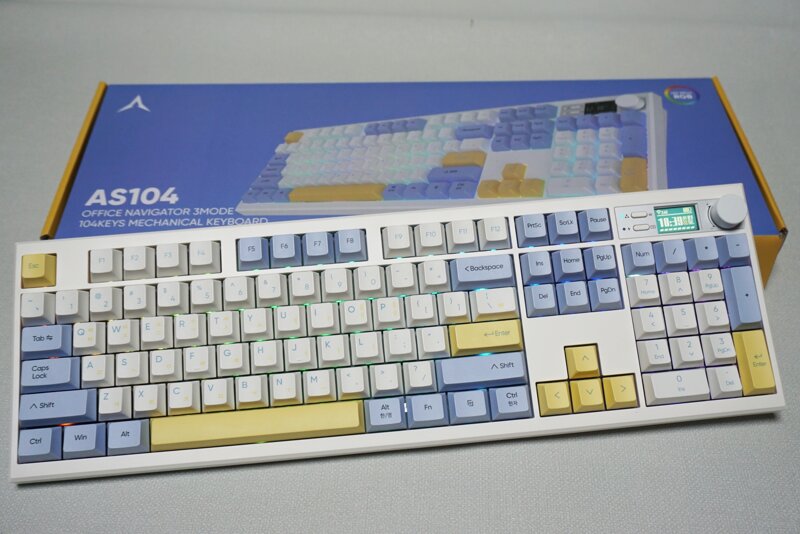
The AS104 is a new 104-key full-size keyboard released by Abko. It comes in two types: Deep Sound switch and Pebble Shooting Star switch. The keyboard I will be reviewing is the linear type Pebble Shooting Star switch.
The biggest feature is that it supports wired/wireless connection and provides a customizable 1.14-inch mini screen. It can be used in any environment, Win & MAC, without any restrictions, and has a sophisticated design and handcrafted fully lubricated keyboard for a neat typing experience, making it a keyboard I would recommend to office workers looking for a keyboard to use in the office.
■ Abko AS104 Package and Design


The components are a keyboard, USB-A to Type-C cable, keycap & switch puller, keyboard cover, and manual. The receiver is stored at the bottom of the keyboard.


First of all, the keycap colors are well decorated with a combination of white, blue, and yellow.

The 1.14-inch mini screen allows you to check the connection mode/battery status/time, and you can even change it by inserting images such as GIF files. It also supports an infinitely rotating knob for easy and convenient volume control.
In the case of time, it seems to be automatically saved to the current time when connected to Windows with a cable. Even after removing the cable or turning it off and using it again, the time was saved.


Anti-slip pads are designed on the bottom, and 2-level height adjustment is possible. The receiver can be stored here.

You can change the WIN/MAC mode and select 2.4G/USB/BT connection methods. The cable connection is C-type.


The switch is hot-swappable, allowing users to easily remove/install it. However, it is a pity that there are no additional switches provided.

Dye-sublimated PBT keycaps were used, and even the color of the font is well designed.

RGB backlighting is supported, so you can select an RGB LED effect that suits you.
■ Web/GIF Animation Software
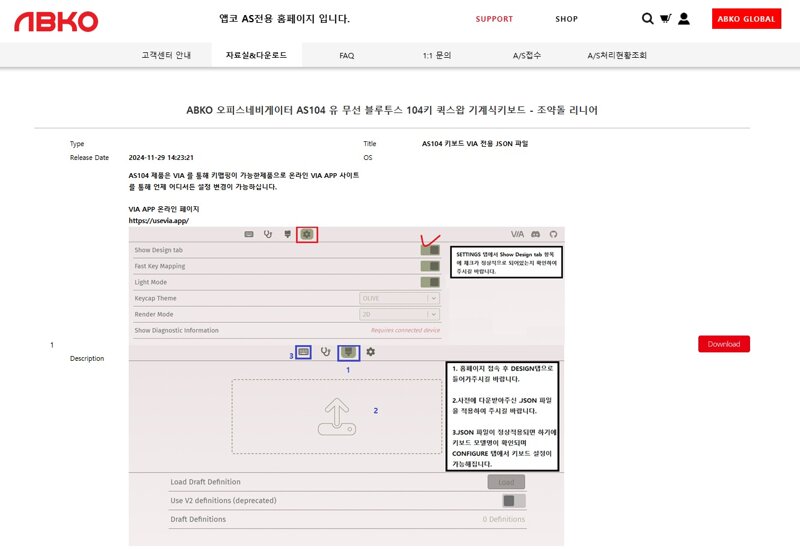
A feature of the AS104 is that it supports VIA programming, which is web software-based. First, you need to download the JSON file from the ABKO website.
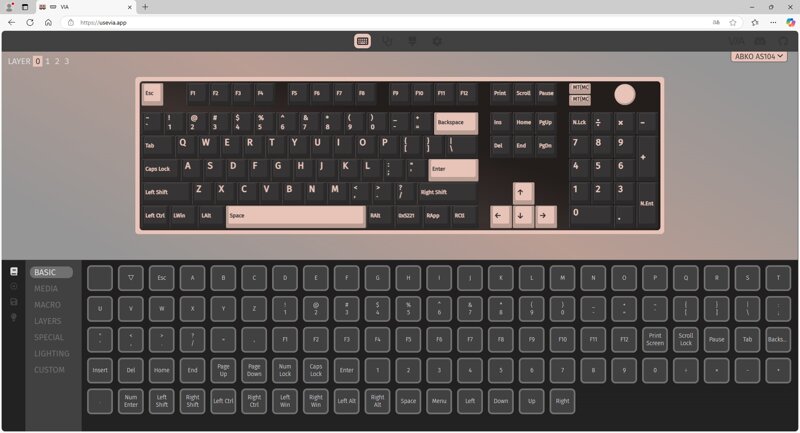
After loading the JSON file from the VIA webpage, you can set keys, macros, and lighting.

The most important function is the image tool program that customizes the 1.14-inch screen.
After installation, you can set the language to Korean by pressing the gear icon, so there were no difficulties in using it. You can add a total of 2 images, GIF1 and GIF2. You can easily use it by uploading the desired image and completing the upload.
You can insert the desired image in this way.
Press the FN+ENTER key to move to the next screen. If you want the clock screen first, press the FN+ENTER key twice.
■ Abko AS104 Office Navigator Keyboard Typing Video
When typing on various keyboards, there were many cases where the sound of the space bar was not captured in most keyboards, but in the case of the AS104 keyboard, I could feel that the sound of the space bar was well captured. It is lightly pressed, and the neat pebble sound is well organized in all keys, so I think I can be more satisfied than I expected.
■ Abko AS104 Office Navigator Keyboard Overall Review

The Abko AS104 keyboard is a keyboard that anyone can be satisfied with, with a passing design and a passing typing feel. It is a keyboard with a well-made overall design and color, and I would like to recommend it to consumers who want to have a keyboard full of their own sensibility, such as media volume control buttons and a customizable screen. Personally, I used a keyboard with a mini screen for the first time, and I think the fact that the usage is simple and you can insert your own image is a big attraction.
There may be many keyboards, but if you are a consumer looking for a quiet linear type keyboard in full array, the ABKO AS104 Office Navigator keyboard would be a good choice.
IT Inven User Review강제이동99
2024-12-17