Post
Nano IPS QHD LG UltraGear Gaming Monitor 27GS85Q Review
"This review was written with a fee provided by LG Electronics online certified store (Ju) Your ID."
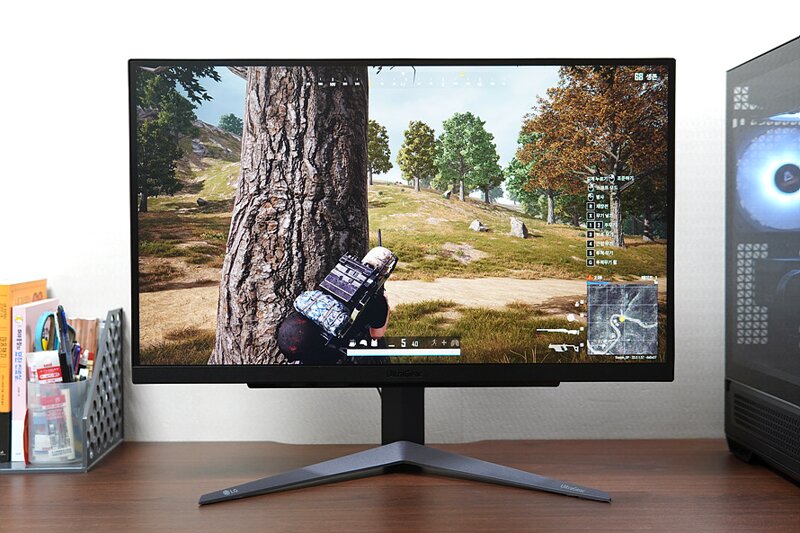
As PC hardware performance such as CPU and graphics cards generally improves, more people are looking for high refresh rate, high-resolution monitors. There are many brands released in the market, but LG UltraGear is one of the most representative gaming monitors. It is a manufacturer with high satisfaction in terms of picture quality, function, and after-sales service. I used the 27-inch gaming monitor 27GS85Q model equipped with a Nano IPS panel. This model features QHD resolution, NVIDIA G-Sync/AMD FreeSync compatibility, VESA Adaptive Sync certification, 1ms response time, HDR 10, Display™400, up to 200Hz refresh rate (o/c), and a stand with height adjustment/tilt/pivot.
"LG 27-inch Gaming Monitor 27GS85Q Design"


The components other than the monitor include a DP cable, HDMI cable, USB cable, power adapter, stand, base, cable hole cover, and manual and warranty. Assembly is tool-less, so it's simple. Although it is not visible because the stand is assembled, it supports a 100x100 VESA hole.


It is true that the demand for 30-inch or larger screens has increased, but 27-inch is still the most sold size. It may be the most suitable for a general desktop environment. It has a very simple design, but the back looks more like a gaming monitor than the front.

Most monitors have ports facing downwards, but they are located in a visible place, making it easy to connect cables. It consists of USB (hub), DP, 2 HDMI, 2 USB, audio, and power. HDMI connection supports a maximum refresh rate of 144Hz, and DP connection supports 180Hz (OC 200Hz), providing an optimal gaming environment.


A 4-way jog controller is placed at the bottom of the front, so the bezel is clean because it is not visible from the front, and it is easy to operate once you get used to it. The stand is also quite stable, and a detachable cover for organizing cables can be attached to the stand.


Using a stand that supports 110mm height adjustment, -5 degrees to +15 degrees tilt, and 90 degrees pivot, you can secure the optimal viewing angle for concentration and comfort during long play sessions.
"LG 27-inch Gaming Monitor 27GS85Q Utilization"


For monitor utilization, I connected it to an Intel 12600K, Nvidia 4070 Ti system via DP. DP is basically set to 180Hz, and you can also use the 120Hz refresh rate supported by Xbox or PlayStation, so it seems useful for console environments as well.


Since it is a monitor for gamers, the OS menu is also composed of various functions. It supports NVIDIA G-Sync compatibility, VESA Adaptive Sync, and AMD FreeSync, which reduce screen tearing and stuttering that can occur during games. You can also use response time settings, FPS counter, two types (+, *) of crosshairs and screen modes, action mode to minimize input signal delay, and dark map mode to clearly recognize enemies in dark places. In particular, if you turn on the overclock option, you can set the maximum refresh rate to 200Hz.


The picture quality is considerable. With a 16:9 aspect ratio, 2560x1440 QHD resolution, Nano IPS display, and Display™400 applied, you can see clear and rich colors. In addition, ISP panels often have noticeable light leakage at the corners when the brightness is increased, but it is impressive that it is not easily visible even at 100 brightness. Flicker-free and wide viewing angles for eye protection are also basic.

Thanks to the wide color gamut of DCI-P3 98% (CIE1976) and the non-glare coating that does not reflect surrounding objects and has low light reflection, it seems sufficient for immersing yourself in photo or video work.


Above all, the 27-inch gaming monitor LG 27GS85Q reveals its advantages in the gaming environment as the title suggests. In fact, high hardware specifications are required to defend QHD 180Hz / OC 200Hz, but if you use the latest CPU and graphics card, you can enjoy considerable picture quality and smoothness. In fact, by utilizing fast response speed, high refresh rate, NVIDIA Adaptive Sync settings, and various related functions, the screen transition and pointing were very smooth, resulting in high satisfaction.


Because it shows high-quality screen, it seems to be highly utilized for watching videos, movies, or OTT services in addition to games. It is also an advantage that the work area is large even though it is 27 inches. In particular, the pivot function is convenient for watching vertical videos, and it is good to be able to see a large amount of documents or web pages at a glance.
"LG 27-inch Gaming Monitor 27GS85Q Review"

It increases the picture quality with QHD high resolution in the 27-inch size that is most popularly selected, and solidly supports the gaming environment with high refresh rate and fast response speed. It is also equipped with useful additional functions, and the excellent color of the Nano IPS display allows it to be used in various ways such as work or multimedia viewing. In addition, the multi-stand and convenient AS of a large manufacturer are also indispensable advantages. If the system supports it to some extent, it is definitely an attractive option, so if you are considering purchasing a 27-inch gaming monitor, I recommend you take a look.
https://smartstore.naver.com/7034144/products/10714199925

#LG모니터, #27GS85Q, #LG27인치게이밍모니터, #울트라기어, #나노IPS,
#QHD게이밍모니터, #LG모니터추천, #27인치모니터, #울트라기어모니터
IT 인벤 유저리뷰사용기쵸이스진상
2025-01-20