Post
Micron Crucial DDR5-6400 CL38 PRO Overclocking Gaming Memory Daewon CTS 7200Hz Overclock Test
This content is a review written after renting or receiving a product free of charge from Daewon CTS.

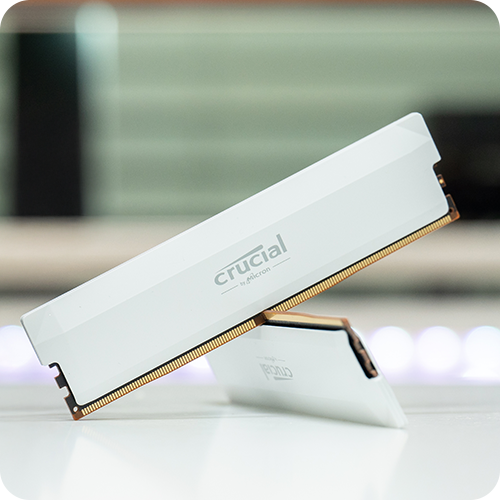
Recently, as the distribution of DDR5 memory has gradually expanded, interest in performance improvement through overclocking is also increasing. In particular, Micron's Crucial DDR5-6400 CL38 PRO Overclocking gaming memory is a product loved by many users for its excellent overclocking margin.
Following the previous post, in this post, I would like to share the results of overclocking this memory to 7200MHz in an AMD system and the performance test.
Overclocking Settings

System Configuration | |
CPU | AMD Ryzen7 9700X |
MB | ASUS TUF B850M-PLUS WIFI 대원씨티에스 |
RAM | Micron Crucial DDR5-6400 Pro Overclocking 16GB x 2ea |
VGA | NVIDIA RTX 4070ti |
SDD | Lexar NM790 2TB |
COOLER | Jonsbo CR-3000E |
Test Program | Using test tools such as CPU-Z, HWINFO, AIDA64, TM5, etc. |
ASUS TUF B850M-PLUS WIFI is AMD's latest motherboard, providing a suitable environment for overclocking with stable power supply and efficient thermal design. In addition, it has the advantage of allowing even beginners to easily change settings through a user-friendly BIOS interface.

Enter the BIOS and load DDR4-6400 from the EXPO profile.

Press the F7 key to enter Advanced Mode, then set the memory frequency to 7200MHz in the Ai Tweaker menu.

Set the FCLK frequency to 1800MHz~2000Mhz to match the 2:1 ratio, or leave it on AUTO.

Adjust detailed RAM timings in the DRAM Timing Control menu. Initially, I set it to CL44-44-44-88 and passed TM5 5 times, then set it to CL40-44-44-88 and completed the TM5 test.

POWER DOWN Enable: Disable
POWER DOWN Enable is a function that deactivates some circuits to reduce power consumption when the memory is idle. Change this function to Disable.
Since AMD systems have difficulty maintaining UCLK DIV1 Mode Enabled (1:1), it must be set to 2:1. The memory control setting can be left on AUTO or set to MEMCLK/2.

Set Dram VDD Voltage and Dram VDDQ Voltage to 1.435V in the Ai Tweaker menu and try booting. After stabilization is complete, we will slowly undervolt to 1.35V, but today we will only check the 1.435V test results.
Stabilization Test

The setting values described above can be booted and stabilized without problems. First, run CPU-z and HWINFO to check the overclocking status and temperature of the memory, and then perform the AIDA64 memory latency test.


The AIDA64 memory latency test was performed twice, and as a result of the test, the memory latency was measured at an average of 79.4ns, and the L3 Cache latency was measured at an average of 10.6ns.
The lower the memory latency and L3 Cache latency, the faster the system's response speed, and the better performance can be achieved in games or high-performance applications.

As a result of the TM5 stabilization test, the total time taken was 50 minutes and 11 seconds, and the average temperature during the test was measured at 57.9~59.7°C.
You can see that all 5 tests passed without errors.

After that, I performed the AIDA64 system stabilization test, and as a result of the 20-minute memory stress test, the average temperature was 42.1~43.3°C and the test was successfully completed.
Game Performance Test

The RAM overclocking test was performed with 7200MHz CL40 and 6400MHz CL38 settings, and the game resolution was set to FHD (1920×1080) and the graphics options were set to Ultra or Highest.


Lost Ark RAM Overclocking (7200MHz vs 6400MHz) performance test results.
In Lost Ark, the maximum frame is expressed according to the monitor refresh rate (144Hz), so excluding the average frame, the remaining test results showed that 1% Low FPS increased by about 1.56% and 0.1% Low FPS increased by 28.4%. In particular, 0.1% Low FPS was significantly improved.


Here are the results of the Battlegrounds FHD/Ultra option test. In the 6400MHz and 7200MHz comparison test, the average FPS increased by approximately 2.11% (slight increase), 1% Low FPS increased by approximately 11.95%, and 0.1% Low FPS increased by approximately 19.88%.
Although the average FPS increase is not significant, the 1% and 0.1% Low FPS have been greatly improved, improving frame maintenance in the game. In particular, in FPS games such as Battlegrounds, it was confirmed that RAM overclocking can reduce instantaneous frame drops and enable more stable play.


God of War Ragnarok Overclocking (7200MHz vs 6400MHz) test results show that the average FPS is almost the same, but 1% Low FPS is slightly improved by +6.13%, and 0.1% Low FPS is improved by +2.45%, slightly improving frame stability.
Ending the review

In AMD systems, if the ratio of MCLK (memory clock) and FCLK (infinity fabric clock) is 2:1, a bottleneck may occur between the memory controller (UCLK) and FCLK, resulting in performance degradation. Therefore, it is difficult to use these test results as an absolute standard in AMD systems, but the Micron Crucial DDR5-6400 CL38 PRO Overclocking model can be easily overclocked to 7200MHz CL40, and a slight increase in average FPS and a significant improvement in 1% Low FPS and 0.1% Low FPS can be expected.
On the other hand, Intel systems do not have the concept of FCLK, and the memory controller (IMC) is more powerful, so it is worth trying overclocking above DDR5 6400MHz. In particular, when overclocking to 7200MHz or higher, performance improvement can be expected without performance degradation.
Through this test, we were able to confirm the excellent overclocking potential of the Micron Crucial DDR5-6400 CL38 PRO Overclocking memory, and we hope that this will be a useful reference for those who were curious about the overclocking performance of this model.
#마이크론 #Crucial #DDR5 #오버클럭 #게이밍메모리 #AMD #인텔 #ASUS #대원씨티에스
IT 인벤 유저리뷰사용기원조광팔이
2025-02-28