Post
ASUS ROG STRIX XG27UCG-W 27-inch High Refresh Rate 4K Gaming Monitor Recommendation
This content was honestly written after renting or being provided with a product free of charge from Daewon CTS.

The DLSS4 feature provided with the RTX50 series release creates an environment where you can play games at amazing high refresh rates even at 4K high resolution. As hardware performance improves, the need for high-resolution gaming monitors is also increasing.
Today, we are going to learn about the ASUS ROG STRIX XG27UCG-W 27-inch 4K gaming monitor released by the global company ASUS. This monitor is characterized by having a dual-mode display function that changes the refresh rate depending on the resolution. Now, let's take a closer look at this product.
Specs and Configuration
The ASUS ROG STRIX XG27UCG-W main specification table is as follows.
Product Specifications | |
Panel Type | Fast IPS |
Screen Size | 27 inches |
Resolution | 4K UHD (3840 x 2160) / FHD (1920 x 1080) Dual Mode |
Refresh Rate | Up to 160Hz in 4K / Up to 320Hz in FHD |
Response Time | 1ms GTG (Gray to Gray) |
Color Gamut | DCI-P3 95%, sRGB 125% |
Contrast Ratio | 1,000:1 |
Maximum Brightness | 400cd |
HDR | VESA DisplayHDR 400 Certified |
Sync Technology | G-SYNC Compatible, FreeSync Premium |
I/O Ports | HDMI 2.1 x 2, DisplayPort 1.4 x 1, USB-C (DP Alt mode) x 1, USB 3.0 Hub x 2 |
Special Features | Dual Mode Display, ASUS AURA Sync, GamePlus, Shadow Boost |
Ergonomics | Tilt (-5° ~ 15°), Swivel (±30°), Pivot (±90°), Height Adjustment (0~120mm) |
VESA Mount | 100 x 100mm |
Daewon CTS, a Tier 1 distributor, is in charge of official distribution, providing reliable A/S service that you can trust even after purchase.


The components include the ASUS ROG STRIX XG27UCG-W monitor (including stand and cable cover), power adapter and three power cables, DisplayPort cable, user manual and warranty, and ROG stickers. All cables are made of high-quality materials, and the DisplayPort cable in particular fully supports 4K 160Hz output.
Appearance and Features


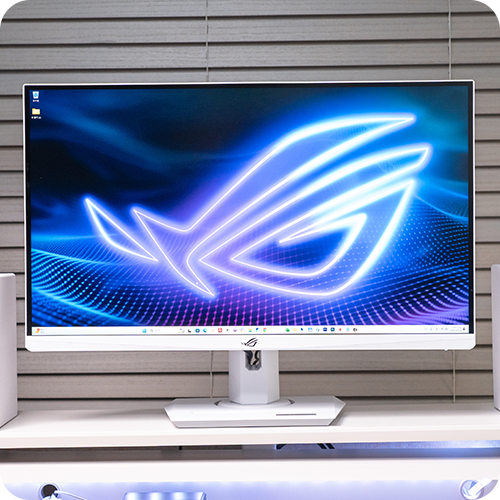
Unlike the black color of the existing ROG series, the ASUS ROG STRIX XG27UCG-W adopts a modern white color. It is a design that perfectly matches the recently popular white desk setup, adding a sophisticated atmosphere to the gaming room. The bezel has a frameless design with three thin sides to increase immersion, and the ROG logo is subtly engraved on the bottom.


RGB lighting is applied around the ROG logo on the back of the monitor, creating a fantastic ambient effect when installed close to the wall.


In particular, it supports ASUS AURA Sync, allowing you to synchronize lighting with other ASUS RGB products (keyboard, mouse, motherboard, etc.) to build a consistent RGB system.


On the rear right side of the monitor are a 5-way joystick and several menu buttons for intuitive OSD menu operation. Various IO ports are located on the bottom of the monitor:
The port configuration is as follows.
2 HDMI 2.1 ports (supports 4K/120Hz)
1 DisplayPort 1.4 port (supports 4K/160Hz with DSC technology)
1 USB-C port (supports DP Alt mode and 65W power supply)
3.5mm audio output port
In particular, the USB-C port provides a one-cable solution by allowing you to connect a laptop to output the screen and charge it at the same time.


The monitor stand can be adjusted to various angles:
Tilt: -5° ~ 20°
Swivel: ±45°
Pivot: ±90° (supports portrait mode)
Height Adjustment: 0~120mm


The base has a width of approximately 43cm, providing stable support, and there is a holder on the front to hold a smartphone so you can check notifications even while gaming. In particular, the USB-C port on the back of the monitor can be used to charge your smartphone, increasing practicality.

It also supports a 100 x 100mm VESA mount, allowing you to install a separate monitor arm to increase desk space utilization.
Display

The ASUS ROG STRIX XG27UCG-W is equipped with a 27-inch Fast IPS panel. The Fast IPS panel provides fast response speeds comparable to TN panels while maintaining the excellent color expression and viewing angle of general IPS panels. It implements a clear screen without afterimages with a 1ms GTG (Gray to Gray) response speed.


It provides a wide viewing angle of 178°/178°, typical of IPS panels, so colors and contrast are not distorted from any angle.


It supports a wide color gamut of DCI-P3 95% and sRGB 130% to express vivid colors. In particular, accurate color expression is possible through individual calibration before leaving the factory. The contrast ratio is 1,000:1, which is a decent level among IPS panels.
It has obtained VESA DisplayHDR 400 certification, enabling basic HDR content playback. With a maximum brightness of 400nits, the contrast between bright and dark areas is more clearly expressed than with a general SDR monitor. Compared to HDR in the OFF state, the highlight areas are brighter and shadow details are clearer when HDR is enabled.
At 4K resolution, the pixel size is very small at 0.155 x 0.155mm, so the details of text and images are outstandingly clear. In particular, readability is excellent when working on documents or browsing the web, so it can be used for various tasks other than gaming.
Dual Mode Display

The biggest feature of this monitor is the dual-mode display function. Users can switch between two modes depending on the situation:

4K UHD Mode (3840 x 2160): Supports a maximum refresh rate of 160Hz and is optimized for situations where high resolution is important, such as single-player AAA titles or graphics work. Using the RTX50 series and DLSS4, you can enjoy games at high frame rates even at 4K resolution.


FHD Mode (1920 x 1080): Supports a maximum refresh rate of 320Hz, making it ideal for situations where reaction speed is important in competitive FPS games such as Valorant, Battlegrounds, and Counter-Strike.

Switching between the two modes can be done quickly through the OSD menu or shortcut keys, providing the optimal environment depending on the game characteristics.
Additional Features

ASUS's GamePlus feature provides a variety of overlay tools to enhance gameplay.

Crosshair: Provides various shapes of aiming point overlays


The aiming line mode provides various options such as 2x magnification.

Timer: Manage specific event timings in the game

FPS Counter: Real-time frame check
In addition, it provides a display alignment function that supports bezel boundary alignment when setting up multiple monitors.
Dynamic Shadow Boost
This feature automatically improves the visibility of dark areas in the game, making it easier to spot enemies. It is especially useful for finding enemies in dark rooms or areas with a lot of shadows, while maintaining the details of bright areas. It is especially useful in battle royale games or survival horror games.
Display Widget Center

The ASUS ROG STRIX XG27UCG-W provides Display Widget Center, software that allows you to easily change monitor settings from your PC without physical buttons.

You can select various display mode selections (FPS, RTS/RPG, Movie, sRGB, etc.), adjust blue light reduction levels, switch dual-mode displays, save and automatically apply game profile-specific settings, and provide screen split and window management functions.

In particular, if you save different setting profiles for each game, the optimized settings are automatically applied when the game is launched, which is convenient.
Ending the review

The ASUS ROG STRIX XG27UCG-W is more than just a gaming monitor, it is an all-in-one monitor that meets the diverse needs of gamers. The fact that you can experience both 4K 160Hz and FHD 320Hz with one monitor through the dual-mode display function will be a great advantage for gamers who enjoy various types of games. The flexibility of supporting high refresh rate monitors and ultra-high-speed refresh rates required in competitive FPS games is a really attractive purchase point.

With excellent color expression and fast response speed provided by the Fast IPS panel, various gaming optimization functions, and a sophisticated white design, all elements are harmoniously combined into a premium gaming monitor. If you are a passionate gamer who pursues the best gaming experience without compromising on the graphic quality of the game provided by 4K resolution and the responsiveness of FHD 320HZ, you should definitely take a look at the ASUS ROG STRIX XG27UCG-W.
#에이수스모니터 #ROG모니터 #XG27UCG #4K게이밍모니터 #듀얼모드디스플레이 #320Hz모니터 #화이트게이밍모니터 #게이밍셋업 #FastIPS #고주사율모니터
IT Inven User Review원조광팔이
2025-04-09