Post
Pulsar Pro Series Susanto-X Medium Review: A brilliant mouse despite its initial problems
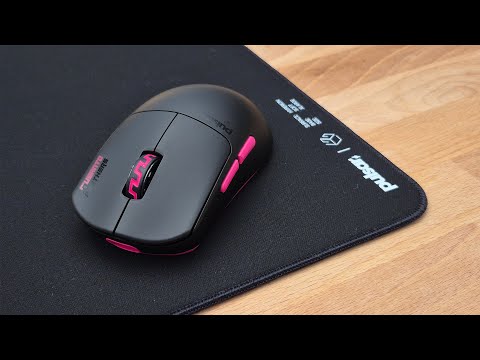
The Pulsar Pro Series Susanto-X Medium is a gaming mouse with a safe shape and flat sides, ideal for aggressive claw grips and small to medium hand sizes. Despite initial issues with firmware and defective clicks, the build quality is solid, the buttons are spammable, and the battery life is excellent. The web-based software offers customization, albeit with some quirks. Overall, it's a versatile option for enthusiasts looking for a high-performance mouse.
1. ⚠️ Initial problems with the Susanto-X firmware and hardware
- ⚠️ The first mouse received suffered a firmware update failure, rendering it unusable.
- ⚠️ The dongle also appeared to be damaged, requiring the use of an 8K dongle from another Pulsar mouse.
- ⚠️ After finally updating the firmware after multiple attempts, the mouse clicks stopped working correctly.
- ✅ Pulsar sent a new unit as a replacement.
- ✅ The firmware update on the new unit was successful, but occasional issues with non-original cables were observed.
- ⚠️ The reviewer criticizes Pulsar for using Compax instead of their own firmware, which generates cohesion problems and possible instabilities.
| Problem | Solution |
|---|---|
| Firmware update failure | Retry multiple times with the original cable and the latest version of Google Chrome. |
| Defective clicks | Unit replacement. |
00:00 - 04:25
1. ⚠️ Initial problems with the Susanto-X firmware and hardware
- ⚠️ The first mouse received suffered a firmware update failure, rendering it unusable.
- ⚠️ The dongle also appeared to be damaged, requiring the use of an 8K dongle from another Pulsar mouse.
- ⚠️ After finally updating the firmware after multiple attempts, the mouse clicks stopped working correctly.
- ✅ Pulsar sent a new unit as a replacement.
- ✅ The firmware update on the new unit was successful, but occasional issues with non-original cables were observed.
- ⚠️ The reviewer criticizes Pulsar for using Compax instead of their own firmware, which generates cohesion problems and possible instabilities.
| Problem | Solution |
|---|---|
| Firmware update failure | Retry multiple times with the original cable and the latest version of Google Chrome. |
| Defective clicks | Unit replacement. |
04:26 - 05:25
2. 📦 Susanto-X unboxing experience and build quality
- ✅ The package includes the mouse, a pink dongle, flat skates, a sticker, a collection card, and a pink USB-A to USB-C cable.
- ⚠️ The included skates are of low quality, without rounded edges.
- ⚠️ The cable is stiff and not recommended for plugged-in use.
- ✅ The build quality is excellent, with no side movement on the buttons or flex or creaking in the structure.
05:26 - 08:41
3. ⚖️ Susanto-X Weight and Shape: A mix between GPX Mini and Hati S Plus
- ⚖️ The mouse weighs around 50 grams with the skates installed.
- ✅ The shape is safe, with flat sides that don't force the grip.
- ✅ It is described as a mix between a GPX Mini and a Hati S Plus, with a design focused on comfort and maneuverability.
- ✅ The flat sides require an adaptation period to avoid pressure points.
- ✅ The design is suitable for claw grips and provides enough contact for a fingertip grip.
08:42 - 09:38
4. 🖐️ Susanto-X Coating and Skates
- ⚠️ The coating is a fingerprint magnet and gets dirty easily.
- ✅ Despite this, it offers good grip, even with cold hands.
- ✅ The skates are 100% virgin PTFE from Pulsar and offer good glide.
- ⚠️ They are not as smooth and fast as Corepads.
09:39 - 10:25
5. 🖱️ Susanto-X Buttons and Scroll Wheel
- ✅ The buttons are spammable thanks to Pulsar's optical switches.
- ✅ The pre-travel is minimal and the post-travel is only noticeable at the ends of the switches.
- ✅ The side buttons are satisfactory.
- ✅ The scroll wheel click is spammable and not too heavy.
- ⚠️ The scroll wheel could have more defined steps.
10:36 - 12:41
6. 🔋 Susanto-X Battery Life and Software
- ✅ The battery life is excellent, lasting a week in 2K on a single charge.
- ✅ The software is a web driver called bbb.pulser.gg.
- ✅ The main page shows all the settings at a glance.
- ✅ You can change the number of DPI stages and colors.
- ⚠️ There is a lack of cohesion and text in Chinese due to the use of ComX.
- ✅ The polling rate can be changed up to 8K.
- ✅ There are three LOD stages and it is recommended to activate turbo mode.
- ✅ Debounce time and macros can be configured.
- ✅ It is recommended to set the low power mode to 0% so as not to lose performance.
- ✅ You can change the dongle display mode to know when to charge it.
- ⚠️ It is recommended to use the original cable and the latest version of Google Chrome to update the firmware.
12:42 - 15:44
7. 🎯 Conclusion: Who is the Pulsar Pro Series Susanto-X Medium for?
- ✅ The mouse is designed for players with hands of 19x10 cm or smaller, with an aggressive claw grip.
- ✅ It is a safe and versatile option, suitable for various grip styles.
- ✅ It has a turbo mode for a 20k fps scan, which minimizes click latency.
- ✅ It is considered a remastered version of the Hati S Plus, with flatter sides and no front flare.
- ✅ It is a safer option than the Superlight 2C.
- ✅ The build quality is excellent and Pulsar support is responsive.
- ⚠️ It is recommended to research and consider whether it is worth the price.