Post
MoErgo Go60 Split Ergonomic Keyboard In-Depth Review: The Best Travel Keyboard?
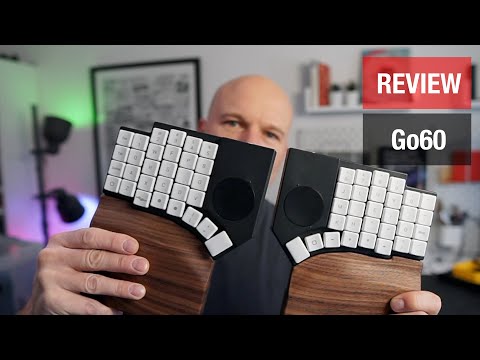
The Go60 from MoErgo is a 60-key split ergonomic keyboard, designed to be the ultimate travel keyboard. It offers wired and wireless connectivity, hot-swappable switches, integrated trackpads, and a powerful layout editor. The reviewer praises its solid build, comfort, and practical features, considering it an excellent option for daily use and travel.
1. 🥇 The Go60: The Best Split and Travel-Friendly Keyboard on the Market
- ✅ The Go60 is considered the best travel-friendly split keyboard currently available.
- ✅ The reviewer explains his absence due to finishing his web development book, Responsive Web Design with HTML5 and CSS.
00:00 - 00:14
1. 🥇 The Go60: The Best Split and Travel-Friendly Keyboard on the Market
- ✅ The Go60 is considered the best travel-friendly split keyboard currently available.
- ✅ The reviewer explains his absence due to finishing his web development book, Responsive Web Design with HTML5 and CSS.
00:34 - 01:38
2. ✨ Go60 Overview: Key Features and Capabilities
- ✅ The Go60 is a fully programmable 60-key split ergonomic keyboard.
- ✅ It can be used fully wired, fully wireless, or even semi-wired.
- ✅ It features hot-swappable switch sockets, mounting options, and two integrated trackpads.
- ✅ The editor allows for powerful programming using the underlying ZMK firmware.
02:04 - 03:20
3. 📦 Go60 Unboxing: Premium Packaging and Included Accessories
- ✅ The Go60 comes in premium packaging, including QR codes for the manual and MoErgo's Discord channel.
- ✅ Accessories include a keycap and switch puller, spare feet for tenting, and spare keycaps for different operating systems.
- ✅ TRRS and USB cables (A to C and C to C) are also included.
- ✅ The keyboard is protected by a yellow plastic wrap and a drawstring felt bag.
03:21 - 04:27
4. 💪 Design and Build Quality: Solidness and Durability
- ✅ The Go60 feels extremely solid and is inspired by ZSA's Voyager.
- ✅ It features channels under the keycaps for easy switch removal.
- ✅ The metal bottom adds sturdiness, and there are orientation holes for optional mounting pucks.
- ✅ There is no flex or creaking, and the overall design focuses on functionality.
04:28 - 05:32
5. ⌨️ Key Layout and Ergonomics: Dedicated Arrow Cluster and Pinky Stagger
- ✅ The Go60 layout has 60 keys, with a dedicated arrow cluster.
- ✅ It features an aggressive pinky stagger for better hand alignment.
- ✅ Having dedicated arrows is useful for Unix shortcuts on macOS and design programs.
05:33 - 06:33
6. 📏 Key Spacing and Switches: Comfort vs. Aesthetics
- ✅ The Go60 uses a custom switch spacing, not MX or Choc.
- ✅ The non-uniform spacing between key columns and rows is a result of adjustments to optimize ergonomics.
- ✅ Despite potential aesthetic preferences for uniform spacing, the Go60's comfort suggests MoErgo made the better decision.
06:34 - 07:18
7. 🌸 Choc V1 Switches and Compatibility: Customization and Sound
- ✅ The Go60 uses Choc V1 switches (also compatible with Choc V2) and ships with Choc V1 Plum or Cherry Blossom switches.
- ✅ The Plum and Cherry switches are silent switches.
- ✅ Being hot-swappable, the switches can be changed for other options.
07:44 - 08:10
8. 🎨 Keycaps and Customization: Material Preferences and RGB Backlighting Options
- ✅ The reviewer plans to change the Palm keycaps at some point, preferring the feel of PBT.
- ✅ The Palm keycaps allow the RGB backlighting to shine through well.
- ✅ MCC profile PBT keycaps or new windowed keycaps are being considered.
08:11 - 09:01
9. 📶 Seamless Bluetooth Connectivity and Quick Device Switching
- ✅ The connection in all tested modes has been seamless.
- ✅ Bluetooth is absolutely perfect and surprisingly fast.
- ✅ The Go60 has a "magic key" that allows for quick switching between Bluetooth devices.
09:02 - 10:18
10. 🔌 Wired Modes: Semi-Wired and Fully Wired Options for Security
- ✅ The Go60 supports a standard semi-wired mode where the left side connects to the computer and the right side connects wirelessly to the left.
- ✅ It also features a fully wired mode where the halves are connected with a TRRS cable, perfect for secure environments where Bluetooth is prohibited.
- ✅ The connectors are electronically protected to prevent them from burning out.
- ✅ A special version of the firmware can be loaded to completely disable wireless.
10:20 - 11:15
11. ⚙️ Personal Setup and Key Layers in the MoErgo Editor
- ✅ The reviewer uses a Colmak DHM layout with home row mods on both sides.
- ✅ Auto-shift keys are present throughout the layout.
- ✅ Layers include a base layer, a layer for numbers and function keys, a navigation layer, and the default magic layer.
- ✅ There is an option to port a layout from a Glove 80.
11:16 - 12:41
12. 🖱️ Integrated Trackpads: Convenient Backups for Travel
- ✅ The Go60 features two 40mm trackpads.
- ✅ The reviewer primarily uses them as a useful backup when out and about and doesn't want to carry a mouse.
- ✅ The trackpads are great for coding, writing, and general office work, and are even useful in applications like Sketch or Figma.
- ✅ They do not support multi-touch functionality.
12:42 - 13:36
13. 🏆 Integrated Trackpad Solidifies Win as Best Travel Keyboard
- ✅ The addition of the integrated trackpads solidifies the Go60's win as the best travel keyboard.
- ✅ The right trackpad functions as a normal trackpad, while the left is used for scrolling.
- ✅ The Go60 can automatically switch layers when the trackpad is in use.
- ✅ There are small bumps above and below each trackpad to indicate north and south.
13:37 - 14:21
14. 😌 Comfort and Ergonomics: Flat Design and Tenting
- ✅ The reviewer prefers flat, low-profile keyboards like the Go60, Voyager, or Corn.
- ✅ The Go60 is exceptionally comfortable for extended use.
- ✅ The Go60 can be tented with the included complimentary feet.
14:22 - 15:54
15. 📐 Adjustable Tenting: Complimentary Feet and Height Options
- ✅ The Go60 can be tented with the included complimentary feet, which snap into the bottom.
- ✅ The system is not as precise as the Glove 80's, but it is much easier to use.
- ✅ The feet are also compatible with the wrist rests.
15:55 - 17:26
16. 🪵 Luxurious Walnut Wrist Rests: Comfort and Aesthetics
- ✅ The walnut wrist rests are a brilliant accessory that enhances comfort.
- ✅ They cost an additional $120, but are worth it.
- ✅ They feature a hard plastic frame with walnut sections on the bottom.
- ✅ The bottom allows for continued tenting with the same leg design.
- ✅ Magnets allow the Go60 to snap into place and stay secure.
17:27 - 18:11
17. 🔩 Mounting Pucks: Custom Mounting Options
- ✅ The $39 mounting pucks allow the Go60 to be mounted on any quarter-inch tripod mount.
- ✅ The mounting pucks magnetically snap into the bottom.
- ✅ The mounting options are virtually limitless.
18:12 - 18:41
18. 💰 Price and Value: Justifying the Cost
- ✅ The Go60 is fairly priced for what it offers.
- ✅ The keyboard costs $299, shipping $25, wrist rests $120, and mounting pucks $39 or $40.
- ✅ There may be a bundle of the Go60 and wrist rests for $399.
18:42 - 19:38
19. ✅ Conclusion: The Most Feature-Packed Split Ergonomic and Travel-Friendly Keyboard
- ✅ The Go60 is the most feature-packed split ergonomic and travel-friendly keyboard you can buy.
- ✅ It is overwhelmingly practical and has great support from MoErgo and their Discord community.
- ✅ It features the underlying ZMK firmware, integrated pointing devices, and every connection option imaginable.
- ✅ The reviewer uses it as his daily driver and highly recommends it.