Post
Wooting 60HE V2 Analysis: The ultimate keyboard for gaming?
The video thoroughly analyzes the Wooting 60HE V2, highlighting its improvements in build quality, new switches, and the implementation of an 8000Hz polling rate. It is compared to the previous version and more economical alternatives such as the MonGeek Fun 60, evaluating whether the updates justify the price.
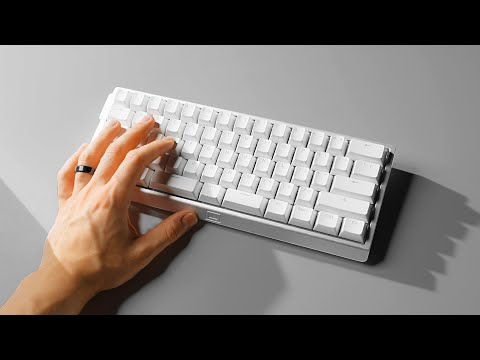
1. 🚀 Introduction to the Wooting 60HE V2: Innovation and key improvements
- ✅ The Wooting 60HE V2 is the new version of a keyboard that revolutionized the industry.
- ✅ It incorporates better build quality and new switches.
- ✅ It offers an 8000Hz polling rate for greater responsiveness.
00:00 - 00:14
1. 🚀 Introduction to the Wooting 60HE V2: Innovation and key improvements
- ✅ The Wooting 60HE V2 is the new version of a keyboard that revolutionized the industry.
- ✅ It incorporates better build quality and new switches.
- ✅ It offers an 8000Hz polling rate for greater responsiveness.
00:15 - 01:26
2. 💡 What is an analog keyboard and why is it popular among professional gamers?
- ✅ Analog keyboards use magnetic switches with a sensor, unlocking advanced functions.
- ✅ They allow you to customize the actuation point and instant key reset.
- ✅ They offer Last Input Priority for more responsive AD strafing, even banned in CS2 due to its advantage.
- ✅ In short, they provide the fastest and most customizable input available.
- ✅ The Wooting 60HE is considered one of the best options in analog keyboards.
01:27 - 03:34
3. 🛠️ Build quality and design: What makes the V2 special?
- ✅ The Wooting 60HE V2 offers a feel similar to a custom and modified keyboard.
- ✅ You can opt for an optional CNC aluminum case for a more premium feel.
- ✅ The plastic case version has also been improved compared to the V1.
- ✅ It incorporates a silicone block on the bottom and high-density foam between the PCB and the FR4 plate for better sound dampening.
- ✅ The PCB is not screwed to the case, but is mounted smoothly with silicone bumpers.
- ✅ The result is a smooth typing feel and a pleasant sound.
03:35 - 04:22
4. ⌨️ New 'Ticken' switches: Improved sound and feel
- ✅ Wooting's new switches have a full 4mm travel and a light to medium actuation force.
- ✅ They feature an enclosed base to improve sound and reduce stem wobble.
- ✅ They offer a smoother and tighter feel compared to the original Leica switches.
- ✅ Although the Geon Raw switches sound a bit better, the Ticken are excellent for stock switches.
04:31 - 05:52
5. ⌨️ Split spacebar: Additional functionality and performance
- ✅ The split spacebar offers three keys in the space of one, increasing functionality.
- ✅ Although it requires adaptation, it provides more keybind options for gaming.
- ✅ The rightmost key can be difficult to reach for quick actions.
- ✅ The split spacebar design facilitates stabilization and improves sound compared to traditional spacebars.
- ✅ It is important to note that the split spacebar version uses a different PCB, so the choice is permanent.
05:53 - 06:57
6. 📊 8000Hz polling rate: Does it make a difference in practice?
- ✅ Unlike wireless mice, the 8000Hz polling rate on a keyboard does not affect battery life or significantly increase CPU usage.
- ✅ Tests revealed an improvement of approximately 1 millisecond in the rapid trigger delay between the 60HE and the V2.
- ✅ This improvement was observed with the rapid trigger set to minimum and Tachyon mode enabled.
06:58 - 08:56
7. 🆚 Wooting 60HE V2 vs. Fun 60: Is the price difference worth it?
- ✅ The MonGeek Fun 60 is an economical alternative ($35) to the Wooting 60HE V2.
- ✅ The difference in build quality is evident, with the Fun 60 feeling like a $35 keyboard.
- ✅ The Wooting 60HE V2 has a delay of approximately 5 milliseconds less than the Fun 60.
- ✅ Despite the difference, the Fun 60 offers good performance, especially for its price.
- ✅ For students with a limited budget, the Fun 60 is an excellent option.
08:57 - 10:12
8. 🤔 Conclusion: Should you upgrade to the Wooting 60HE V2?
- ✅ If you already have the original Wooting 60HE, consider purchasing a metal case and aftermarket switches to get performance similar to the V2.
- ✅ The improvements of the V2 are mainly focused on build quality and immediate user experience.
- ✅ The 8000Hz polling rate may not be a valuable upgrade for most users, unless they have a high refresh rate monitor and a high-end PC.
- ✅ If you are upgrading from a cheaper analog keyboard, the Wooting 60HE V2 is an excellent option.
- ✅ Wooting continues to lead the market in performance and innovation in gaming keyboards.