Post
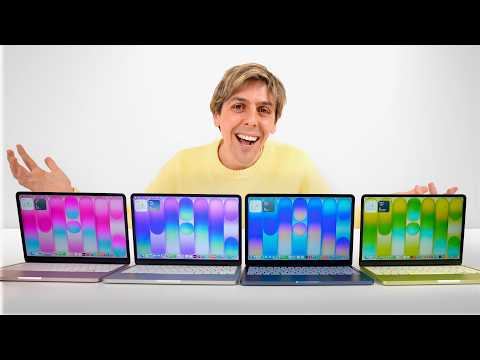
MacBook Neo: All Colors Unboxing and Detailed AnalysisApple's latest and most affordable MacBook Neo has been released in four attractive colors. In this video, we unbox the MacBook Neo in Blush, Indigo, Silver, and Citrus colors one by one, taking a detailed look at its design, performance, and key features. Equipped with the A18 Pro chip, it provides sufficient performance for everyday tasks and AI features, and we deeply analyze the overall user experience, including the display, speakers, and keyboard, along with the characteristics of each color.
1. 💖 Blush MacBook Neo Unboxing and Design Features
· The MacBook Neo is Apple's new budget-friendly laptop, equipped with the A18 Pro chip.
· The first color unboxed, Blush, is a light pink with a very soft, rounded edge design.
· The Apple logo feels laser-cut, integrated with the body rather than a separate material like on existing MacBook Airs or Pros.
· It shows beautiful color tones that shift to a silver hue when it catches the light.
· The anti-slip rubber feet on the bottom are designed to match the body color.
· Ports include a right speaker, and on the left, a headphone jack and two USB-C ports. Thunderbolt ports are not provided.
· The 256GB base model does not have Touch ID and is replaced by a standard lock screen button.
· The keyboard is a light pink that matches the body color, rated as one of Apple's best designs.
· Despite its budget-friendly price, it shows amazing detail and completeness in its design.
· The first color unboxed, Blush, is a light pink with a very soft, rounded edge design.
· The Apple logo feels laser-cut, integrated with the body rather than a separate material like on existing MacBook Airs or Pros.
· It shows beautiful color tones that shift to a silver hue when it catches the light.
· The anti-slip rubber feet on the bottom are designed to match the body color.
· Ports include a right speaker, and on the left, a headphone jack and two USB-C ports. Thunderbolt ports are not provided.
· The 256GB base model does not have Touch ID and is replaced by a standard lock screen button.
· The keyboard is a light pink that matches the body color, rated as one of Apple's best designs.
· Despite its budget-friendly price, it shows amazing detail and completeness in its design.
00:00 - 04:49
1. 💖 Blush MacBook Neo Unboxing and Design Features
· The MacBook Neo is Apple's new budget-friendly laptop, equipped with the A18 Pro chip.
· The first color unboxed, Blush, is a light pink with a very soft, rounded edge design.
· The Apple logo feels laser-cut, integrated with the body rather than a separate material like on existing MacBook Airs or Pros.
· It shows beautiful color tones that shift to a silver hue when it catches the light.
· The anti-slip rubber feet on the bottom are designed to match the body color.
· Ports include a right speaker, and on the left, a headphone jack and two USB-C ports. Thunderbolt ports are not provided.
· The 256GB base model does not have Touch ID and is replaced by a standard lock screen button.
· The keyboard is a light pink that matches the body color, rated as one of Apple's best designs.
· Despite its budget-friendly price, it shows amazing detail and completeness in its design.
· The first color unboxed, Blush, is a light pink with a very soft, rounded edge design.
· The Apple logo feels laser-cut, integrated with the body rather than a separate material like on existing MacBook Airs or Pros.
· It shows beautiful color tones that shift to a silver hue when it catches the light.
· The anti-slip rubber feet on the bottom are designed to match the body color.
· Ports include a right speaker, and on the left, a headphone jack and two USB-C ports. Thunderbolt ports are not provided.
· The 256GB base model does not have Touch ID and is replaced by a standard lock screen button.
· The keyboard is a light pink that matches the body color, rated as one of Apple's best designs.
· Despite its budget-friendly price, it shows amazing detail and completeness in its design.
04:50 - 07:25
2. 💙 Indigo MacBook Neo Unboxing and Touch ID Presence
· The Indigo color is a more saturated and brighter blue than Apple's previous blue MacBooks.
· This is the 512GB version, and this model includes Touch ID.
· The 'Hello' text inside the package also shows color-matching detail.
· The color brightens with light but maintains a beautiful blue tone.
· The keyboard also perfectly matches the Indigo color in blue, revealing a strong personality.
· The bezels are black; some suggest it would have been more distinctive with white bezels, like the iMac.
· This is the 512GB version, and this model includes Touch ID.
· The 'Hello' text inside the package also shows color-matching detail.
· The color brightens with light but maintains a beautiful blue tone.
· The keyboard also perfectly matches the Indigo color in blue, revealing a strong personality.
· The bezels are black; some suggest it would have been more distinctive with white bezels, like the iMac.
07:26 - 09:45
3. 🤍 Silver MacBook Neo Unboxing and Clean Design
· The Silver color might seem the most basic, but it boasts a beautiful appearance thanks to the color-matched keyboard.
· This is a 256GB model with no Touch ID.
· It is expected to be popular among users looking for the most affordable MacBook.
· The Apple logo has a darker tone compared to other colors, and the bottom rubber feet are gray.
· The aluminum material resists fingerprints well, keeping it consistently clean.
· The white keyboard is a rare sight on a MacBook, and there's a slight regret that it wasn't paired with white bezels for an even cooler look.
· This is a 256GB model with no Touch ID.
· It is expected to be popular among users looking for the most affordable MacBook.
· The Apple logo has a darker tone compared to other colors, and the bottom rubber feet are gray.
· The aluminum material resists fingerprints well, keeping it consistently clean.
· The white keyboard is a rare sight on a MacBook, and there's a slight regret that it wasn't paired with white bezels for an even cooler look.
09:46 - 11:54
4. 🍋 Citrus MacBook Neo Unboxing and Color Comparison
· Citrus is my favorite color, an 8GB RAM, 256GB storage model.
· The 'Hello' text and documents inside the package also match the yellow color.
· The keyboard is a very light yellow, close to vanilla, perfectly matching the Citrus body.
· To compare how yellow or green the Citrus color is, lemons and limes were used.
· It's closer to a lime than a lemon, leaning more towards green than yellow, sitting somewhere in between.
· The 'Hello' text and documents inside the package also match the yellow color.
· The keyboard is a very light yellow, close to vanilla, perfectly matching the Citrus body.
· To compare how yellow or green the Citrus color is, lemons and limes were used.
· It's closer to a lime than a lemon, leaning more towards green than yellow, sitting somewhere in between.
11:55 - 17:54
5. 💻 MacBook Neo Key Features and Performance Analysis
· Display: The 13-inch Liquid Retina display is excellent for everyday tasks as well as watching movies. It boasts outstanding contrast and color ratios, making it best-in-class among competitors at a similar price point.
· Speakers: Dual side-firing speakers and spatial audio provide immersive sound. Despite being a budget MacBook, it delivers excellent audio quality.
· Webcam and Microphone: The 1080p webcam offers decent quality suitable for video conferences or online classes. Microphone quality is also good.
· A18 Pro Chip Performance: Although it features the A18 Pro, an iPhone chip, it's not slow at all for everyday tasks like web browsing, email, Pages, Keynote, and Numbers.
· App Launch Test: In a test running 49 macOS apps simultaneously, they opened surprisingly fast and operated smoothly without lag, proving the powerful performance of the A18 Pro chip.
· Keyboard: The Magic Keyboard provides an excellent typing experience, but the lack of backlit keys makes working in the dark difficult.
· Trackpad: Unlike the MacBook Air or Pro, it uses a physical click mechanism instead of haptic feedback. Initially, I was skeptical, but using it provides an excellent experience without feeling like a downgrade.
· Battery Life: According to Apple, it can provide up to 16 hours of video playback, which will be tested in a full review later.
· Overall Review: Despite being a budget model, the MacBook Neo offers an excellent display, a satisfying keyboard, a stable trackpad, optimized macOS, and an attractive design and colors. It's suitable for students, business people, or anyone who simply needs a laptop, and it can even handle light video editing.
· Speakers: Dual side-firing speakers and spatial audio provide immersive sound. Despite being a budget MacBook, it delivers excellent audio quality.
· Webcam and Microphone: The 1080p webcam offers decent quality suitable for video conferences or online classes. Microphone quality is also good.
· A18 Pro Chip Performance: Although it features the A18 Pro, an iPhone chip, it's not slow at all for everyday tasks like web browsing, email, Pages, Keynote, and Numbers.
· App Launch Test: In a test running 49 macOS apps simultaneously, they opened surprisingly fast and operated smoothly without lag, proving the powerful performance of the A18 Pro chip.
· Keyboard: The Magic Keyboard provides an excellent typing experience, but the lack of backlit keys makes working in the dark difficult.
· Trackpad: Unlike the MacBook Air or Pro, it uses a physical click mechanism instead of haptic feedback. Initially, I was skeptical, but using it provides an excellent experience without feeling like a downgrade.
· Battery Life: According to Apple, it can provide up to 16 hours of video playback, which will be tested in a full review later.
· Overall Review: Despite being a budget model, the MacBook Neo offers an excellent display, a satisfying keyboard, a stable trackpad, optimized macOS, and an attractive design and colors. It's suitable for students, business people, or anyone who simply needs a laptop, and it can even handle light video editing.