Post
Fortnite Yeti Skin Free Guide: How to Use Mobile Quests and XP MapsA new Yedi skin has been revealed in collaboration with Android, coinciding with the launch of Fortnite Chapter 7 Season 2. This skin offers various edit styles and can be obtained for free by anyone who completes specific quests on mobile devices and utilizes an XP map. Play Fortnite on mobile now and get your hands on the special Yedi skin!
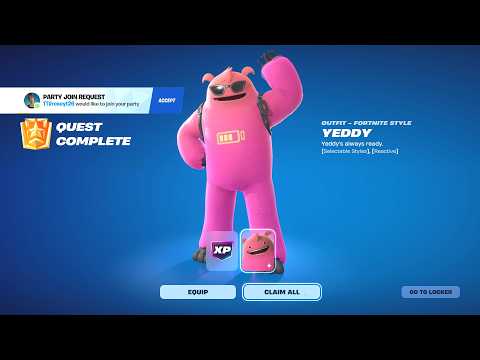
1. 🎮 Introducing the Free Yedi Skin & How to Get It
· A new Yedi skin is available for free with the launch of Fortnite Chapter 7 Season 2.
· Fortnite has partnered with Android to release this skin as the game returns to the Google Play Store.
· The Yedi skin offers various edit styles, allowing you to change colors, whether it wears glasses, and its reactivity.
· This skin can be obtained for free on all mobile devices, including Android, iPad, and iPhone.
· Fortnite has partnered with Android to release this skin as the game returns to the Google Play Store.
· The Yedi skin offers various edit styles, allowing you to change colors, whether it wears glasses, and its reactivity.
· This skin can be obtained for free on all mobile devices, including Android, iPad, and iPhone.
00:00 - 00:25
1. 🎮 Introducing the Free Yedi Skin & How to Get It
· A new Yedi skin is available for free with the launch of Fortnite Chapter 7 Season 2.
· Fortnite has partnered with Android to release this skin as the game returns to the Google Play Store.
· The Yedi skin offers various edit styles, allowing you to change colors, whether it wears glasses, and its reactivity.
· This skin can be obtained for free on all mobile devices, including Android, iPad, and iPhone.
· Fortnite has partnered with Android to release this skin as the game returns to the Google Play Store.
· The Yedi skin offers various edit styles, allowing you to change colors, whether it wears glasses, and its reactivity.
· This skin can be obtained for free on all mobile devices, including Android, iPad, and iPhone.
00:26 - 00:55
2. 📱 Installing Fortnite Mobile & Account Login
· For Android devices, download Fortnite from the Google Play Store.
· For Apple devices, first download the Epic Games Store from the Fortnite website, then download Fortnite from the Epic Games Store.
· You must log in to your Epic Games account before downloading the game.
· Once the game is fully installed and you've reached the main screen, you can proceed to the next steps.
· For Apple devices, first download the Epic Games Store from the Fortnite website, then download Fortnite from the Epic Games Store.
· You must log in to your Epic Games account before downloading the game.
· Once the game is fully installed and you've reached the main screen, you can proceed to the next steps.
01:10 - 01:25
3. ✅ How to Activate Mobile App Quests
· Navigate to the Quests tab and look for 'Mobile App Quests'.
· If the quests are not visible, join a solo Battle Royale game.
· Once you arrive at the spawn island, immediately leave the game.
· Return to the Quests tab, and the Mobile App Quests should now be active.
· If the quests are not visible, join a solo Battle Royale game.
· Once you arrive at the spawn island, immediately leave the game.
· Return to the Quests tab, and the Mobile App Quests should now be active.
01:26 - 01:44
4. 🤝 First Quest: Invite a Friend
· The first Mobile App Quest is 'Invite a Friend'.
· Click on your profile icon, then navigate to the third tab.
· Click the 'Invite Friend' button at the bottom.
· The quest will automatically complete just by clicking the button, even if you don't actually invite a friend.
· Click on your profile icon, then navigate to the third tab.
· Click the 'Invite Friend' button at the bottom.
· The quest will automatically complete just by clicking the button, even if you don't actually invite a friend.
01:45 - 03:57
5. 🚀 Second Quest: Level Up with an XP Map
· The second quest is 'Gain 1 Level'. You can complete this quickly using an XP map.
· Return to the lobby and search for 'Shuffle Gamer'.
· Find and follow the Shuffle Gamer profile in the Creator section.
· On the Shuffle Gamer page, find the 'Amazing Red Versus Blue' map, or enter the map code 8442-8238-1452.
· Add the map to your favorites, select it, then change the game mode from 'Public Game' to 'Private Game' and start playing.
· Here's how to earn XP within the map:
· From the blue team spawn point, take the ramp, launch yourself, and glide to the left corner.
· Once in the corner, use any emote, and a button will appear. Click this button to enter a room.
· Go to the area with a 1-second timer and interact with the pin pad.
· Enter the secret code 8831 and confirm to proceed to the XP earning area.
· Here, you'll earn XP every second, and you can collect XP stars by riding the grind rail for additional XP.
· If you need more XP, pick up a SCAR and shoot the dummies for even more XP.
· The AFK chat method still works on mobile: start shooting, then press the chat icon to open chat, and your character will automatically shoot. Don't forget to jump once every 5 minutes.
· After accumulating approximately 50,000-80,000 XP, exit the room and stand still for a few minutes for the XP to apply to your account.
· Once the XP is applied, a pop-up will appear, and returning to the lobby will unlock the Yedi skin.
· Return to the lobby and search for 'Shuffle Gamer'.
· Find and follow the Shuffle Gamer profile in the Creator section.
· On the Shuffle Gamer page, find the 'Amazing Red Versus Blue' map, or enter the map code 8442-8238-1452.
· Add the map to your favorites, select it, then change the game mode from 'Public Game' to 'Private Game' and start playing.
· Here's how to earn XP within the map:
· From the blue team spawn point, take the ramp, launch yourself, and glide to the left corner.
· Once in the corner, use any emote, and a button will appear. Click this button to enter a room.
· Go to the area with a 1-second timer and interact with the pin pad.
· Enter the secret code 8831 and confirm to proceed to the XP earning area.
· Here, you'll earn XP every second, and you can collect XP stars by riding the grind rail for additional XP.
· If you need more XP, pick up a SCAR and shoot the dummies for even more XP.
· The AFK chat method still works on mobile: start shooting, then press the chat icon to open chat, and your character will automatically shoot. Don't forget to jump once every 5 minutes.
· After accumulating approximately 50,000-80,000 XP, exit the room and stand still for a few minutes for the XP to apply to your account.
· Once the XP is applied, a pop-up will appear, and returning to the lobby will unlock the Yedi skin.