Post
Counter-Strike 2 Performance and Throttling Test Results on MacBook Pro M5This is an in-depth analysis of Counter-Strike 2 (CS2) performance and throttling on the MacBook Pro M5. The game was run using custom Wine and a D3D Metal translation layer. We closely monitored FPS, fan noise, and temperature changes during bot practice and actual multiplayer matches at high resolution and high graphics settings. The results confirmed that the M5 chip maintained stable performance without throttling even during extended play, providing an overall smooth gaming experience.
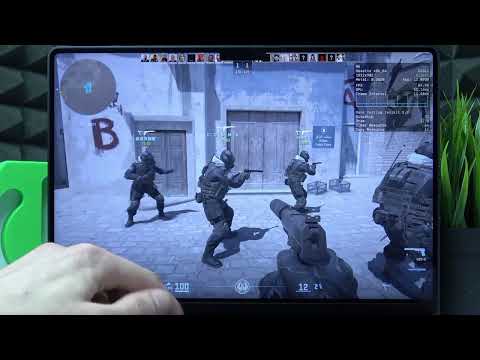
1. 🎮 CS2 Test Environment and MacBook Pro M5 Specs
· Custom Wine, not Crossover, was used to run CS2 on the MacBook Pro M5 2026.
· A D3D Metal translation layer was used for the backend, with esync and msync enabled.
· In-game performance HUD was used to monitor FPS.
· The MacBook Pro M5 features 16GB unified memory and approximately 500GB storage.
· The game was run at 'High' settings at native resolution.
· External recording methods were used instead of display recording to avoid resource waste from recording overlays.
· A D3D Metal translation layer was used for the backend, with esync and msync enabled.
· In-game performance HUD was used to monitor FPS.
· The MacBook Pro M5 features 16GB unified memory and approximately 500GB storage.
· The game was run at 'High' settings at native resolution.
· External recording methods were used instead of display recording to avoid resource waste from recording overlays.
| Category | Details |
|---|---|
| MacBook Model | MacBook Pro M5 2026 |
| Memory | 16GB Unified Memory |
| Storage | Approx. 500GB |
| Execution Method | Custom Wine (D3D Metal, esync/msync enabled) |
| Graphics Settings | High, Native Resolution |
00:00 - 01:57
1. 🎮 CS2 Test Environment and MacBook Pro M5 Specs
· Custom Wine, not Crossover, was used to run CS2 on the MacBook Pro M5 2026.
· A D3D Metal translation layer was used for the backend, with esync and msync enabled.
· In-game performance HUD was used to monitor FPS.
· The MacBook Pro M5 features 16GB unified memory and approximately 500GB storage.
· The game was run at 'High' settings at native resolution.
· External recording methods were used instead of display recording to avoid resource waste from recording overlays.
· A D3D Metal translation layer was used for the backend, with esync and msync enabled.
· In-game performance HUD was used to monitor FPS.
· The MacBook Pro M5 features 16GB unified memory and approximately 500GB storage.
· The game was run at 'High' settings at native resolution.
· External recording methods were used instead of display recording to avoid resource waste from recording overlays.
| Category | Details |
|---|---|
| MacBook Model | MacBook Pro M5 2026 |
| Memory | 16GB Unified Memory |
| Storage | Approx. 500GB |
| Execution Method | Custom Wine (D3D Metal, esync/msync enabled) |
| Graphics Settings | High, Native Resolution |
01:59 - 07:50
2. 🕹️ Initial Gameplay and FPS Stability
· FPS remained very stable for the first 2 minutes after starting the game.
· In bot practice mode, initial FPS recorded over 100.
· During play, FPS occasionally dropped to a minimum of 60, but overall gameplay was very smooth.
· After about 10 minutes of play, there were no freezing issues, and the game ran smoothly.
· 70-80 FPS might not be enough for competitive players, but settings can be lowered to achieve up to 200 FPS.
· After 10 minutes of play, the laptop did not get hot, and the fans did not activate, resulting in no noise.
· In bot practice mode, initial FPS recorded over 100.
· During play, FPS occasionally dropped to a minimum of 60, but overall gameplay was very smooth.
· After about 10 minutes of play, there were no freezing issues, and the game ran smoothly.
· 70-80 FPS might not be enough for competitive players, but settings can be lowered to achieve up to 200 FPS.
· After 10 minutes of play, the laptop did not get hot, and the fans did not activate, resulting in no noise.
07:58 - 12:05
3. 🔥 Multiplayer and Extended Play Performance
· In actual multiplayer mode, performance was similar to bot matches, but occasional freezing occurred.
· After about 20 minutes of play, FPS remained stable, and the laptop became warmer than before, but the fans were still not fully active.
· After 25 minutes of play, when changing the map to Nuke, FPS tended to be slightly lower than on the Mirage map.
· The slight freezing that occurs during map changes is due to shader loading, which only happens when loading that map for the first time and disappears in subsequent plays.
· After about 20 minutes of play, FPS remained stable, and the laptop became warmer than before, but the fans were still not fully active.
· After 25 minutes of play, when changing the map to Nuke, FPS tended to be slightly lower than on the Mirage map.
· The slight freezing that occurs during map changes is due to shader loading, which only happens when loading that map for the first time and disappears in subsequent plays.
12:18 - 15:55
4. ✅ 40-Minute Throttling Test Final Results
· After about 30 minutes of gameplay, there were no freezing issues, and fan noise started to be slightly audible but was almost imperceptible.
· After 40 minutes of gameplay, the game continued to run smoothly without any FPS drops.
· In most cases, it maintained 80-90 FPS, occasionally dropping to 60 FPS in some sections, but still without affecting gameplay.
· Fan noise remained at the same minimal level as before.
· The MacBook Pro M5 passed the CS2 throttling test. The laptop became slightly warm but not hot, and showed consistent performance without FPS drops.
· After 40 minutes of gameplay, the game continued to run smoothly without any FPS drops.
· In most cases, it maintained 80-90 FPS, occasionally dropping to 60 FPS in some sections, but still without affecting gameplay.
· Fan noise remained at the same minimal level as before.
· The MacBook Pro M5 passed the CS2 throttling test. The laptop became slightly warm but not hot, and showed consistent performance without FPS drops.