Post
LG 27-inch 4K Monitor, the ultimate bang for your buck? LG 27US550-W Detailed ReviewThe LG 27-inch UltraFine 4K monitor 27US550-W offers sharp image quality and excellent color reproduction at a reasonable price. We'll take a closer look at how this monitor, with its versatility for productivity, content consumption, and design work, can transform your workspace.
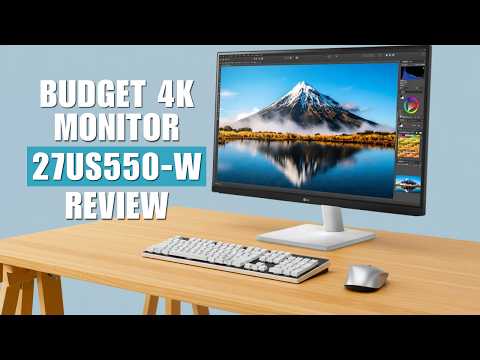
1. ✨ LG 27US550-W: A Monitor Focused on Fundamentals, Not Flash
· The LG 27-inch UltraFine 4K monitor is a product that focuses on sharp image quality, stable color reproduction, and a comfortable user experience, rather than flashy specs or design.
· It can be an attractive option for users who value practical benefits over complex marketing jargon.
· This review analyzes the monitor's pros and cons to evaluate its suitability for different users.
· It can be an attractive option for users who value practical benefits over complex marketing jargon.
· This review analyzes the monitor's pros and cons to evaluate its suitability for different users.
00:01 - 00:44
1. ✨ LG 27US550-W: A Monitor Focused on Fundamentals, Not Flash
· The LG 27-inch UltraFine 4K monitor is a product that focuses on sharp image quality, stable color reproduction, and a comfortable user experience, rather than flashy specs or design.
· It can be an attractive option for users who value practical benefits over complex marketing jargon.
· This review analyzes the monitor's pros and cons to evaluate its suitability for different users.
· It can be an attractive option for users who value practical benefits over complex marketing jargon.
· This review analyzes the monitor's pros and cons to evaluate its suitability for different users.
00:49 - 01:37
2. 🖥️ Clean and Practical Design and Stand, Disappointing Port Selection
· With its slim bezels and clutter-free design, it fits well into any workspace.
· The stand, which allows for tilt adjustment, is useful in various environments for coding, reading, and document work.
· The stand focuses on functionality, and might be disappointing if you expect a premium finish or a metal arm. VESA mount support allows for the use of a separate monitor arm.
· The port selection is practical, with one DP, two HDMI 2.0 ports, and a headphone output. Dual HDMI is convenient for connecting multiple devices, but the lack of a USB-C port remains a drawback.
· The stand, which allows for tilt adjustment, is useful in various environments for coding, reading, and document work.
· The stand focuses on functionality, and might be disappointing if you expect a premium finish or a metal arm. VESA mount support allows for the use of a separate monitor arm.
· The port selection is practical, with one DP, two HDMI 2.0 ports, and a headphone output. Dual HDMI is convenient for connecting multiple devices, but the lack of a USB-C port remains a drawback.
02:23 - 03:39
3. 🌟 Sharpness of 27-inch 4K Resolution and Excellent Color Reproduction
· The 27-inch 4K panel provides a sharp and clean visual experience for all content, including text, photos, icons, and videos.
· The maximum brightness of 300 nits is sufficient for most indoor environments, but may be slightly lacking in brightly lit spaces.
· With approximately 90% DCI-P3 color gamut coverage, it expresses vivid yet natural colors, making it suitable for casual creative tasks like photo editing and thumbnail creation.
· Thanks to the wide viewing angles typical of IPS panels, you can view a consistent screen from any angle without color distortion.
· However, the contrast ratio is lower compared to VA panels, so the black levels might be somewhat disappointing in dark environments.
· While it supports HDR10, the 300 nits brightness and the limitations of a typical IPS panel make it difficult to expect a dramatic HDR experience comparable to premium displays.
· The maximum brightness of 300 nits is sufficient for most indoor environments, but may be slightly lacking in brightly lit spaces.
· With approximately 90% DCI-P3 color gamut coverage, it expresses vivid yet natural colors, making it suitable for casual creative tasks like photo editing and thumbnail creation.
· Thanks to the wide viewing angles typical of IPS panels, you can view a consistent screen from any angle without color distortion.
· However, the contrast ratio is lower compared to VA panels, so the black levels might be somewhat disappointing in dark environments.
· While it supports HDR10, the 300 nits brightness and the limitations of a typical IPS panel make it difficult to expect a dramatic HDR experience comparable to premium displays.
04:20 - 05:11
4. 💼 Provides an Optimal Environment for Productivity Enhancement
· The 4K resolution offers a spacious workspace, facilitating multitasking. You can work comfortably with multiple windows open simultaneously or edit complex timelines without feeling cramped.
· The excellent text readability and clean document display are particularly beneficial for writers, coders, students, and office workers.
· The reader mode, which reduces blue light, helps lessen eye strain during nighttime work.
· Screen splitting and window layout software enhance work efficiency.
· The excellent text readability and clean document display are particularly beneficial for writers, coders, students, and office workers.
· The reader mode, which reduces blue light, helps lessen eye strain during nighttime work.
· Screen splitting and window layout software enhance work efficiency.
05:12 - 05:53
5. 🎮 Gaming Performance: Sufficient for Casual Gamers, Lacking for Hardcore Gamers
· With a 60Hz refresh rate and 5ms response time, it can be used without issues for general desktop use, casual gaming, story-driven games, and strategy simulations.
· However, for users accustomed to high refresh rates of 144Hz or more, 60Hz might feel a bit slow, and it's not suitable for fast-paced FPS or e-sports games.
· This monitor prioritizes productivity over gaming performance.
· However, for users accustomed to high refresh rates of 144Hz or more, 60Hz might feel a bit slow, and it's not suitable for fast-paced FPS or e-sports games.
· This monitor prioritizes productivity over gaming performance.
05:54 - 06:32
6. 🤔 Considerations Before Purchase: No Built-in Speakers, No USB Hub
· It lacks built-in speakers, so separate speakers or headphones are required.
· The absence of a USB hub function may necessitate an additional hub or dock for connecting accessories, webcams, etc.
· While the overall panel quality is excellent, it lacks the fancy extra features found in the latest premium monitors.
· The absence of a USB hub function may necessitate an additional hub or dock for connecting accessories, webcams, etc.
· While the overall panel quality is excellent, it lacks the fancy extra features found in the latest premium monitors.
06:33 - 07:59
7. 🎯 LG 27US550-W: Recommended for These Users!
· Users who want a sharp 27-inch 4K resolution, accurate colors, comfortable long-term use, and excellent ergonomic adjustments.
· Office workers, students, budget-conscious creators, and writers looking for a clean and reliable work monitor.
· Users who value practicality and are considering a dual-monitor setup.
· On the other hand, if you prioritize USB-C single-cable connection, high refresh rates, superior contrast ratios, HDR performance, or built-in speakers, it's advisable to consider other options.
· This monitor focuses on fundamentals like resolution, color reproduction, ergonomics, and stable performance, rather than flashy features, proving its value over time.
· Office workers, students, budget-conscious creators, and writers looking for a clean and reliable work monitor.
· Users who value practicality and are considering a dual-monitor setup.
· On the other hand, if you prioritize USB-C single-cable connection, high refresh rates, superior contrast ratios, HDR performance, or built-in speakers, it's advisable to consider other options.
· This monitor focuses on fundamentals like resolution, color reproduction, ergonomics, and stable performance, rather than flashy features, proving its value over time.